

Use Microsoft Security Copilot’s detonation summary to review suspicious email URLs and files. Verify artifacts, distinguish sandbox behavior from user activity, and document gaps.
The useful question is what the sandbox actually observed
An analyst receives a suspicious-email report and finds a long chain of URL or attachment-analysis details. An AI explanation can make that material easier to read, but a concise story can also hide a critical boundary: behavior in an analysis environment is not proof that the same behavior occurred on an employee’s device.
Microsoft’s September 24, 2026 security update describes a Security Copilot detonation summary for URL and file sandboxing results. The Email Entity documentation explains the available summary sections and how to generate one. This is September context within the expanded 30-day research window, not a claim of a new October launch. The following is a proposed review workflow; no customer incident or product benchmark was tested for this article.
The workflow fits teams managing Microsoft 365 and business email security. Its output is a checked evidence note with explicit questions for the next investigator, rather than an automatic decision to release or remove a message.

1. Confirm access and find an item with existing results
You need authorized access to the Email Entity page, the relevant Defender and Security Copilot entitlements, and the case records you are allowed to inspect. Microsoft describes the capability for organizations using both products. Confirm provisioning, roles and any associated consumption with your administrator; do not assume a basic Microsoft 365 subscription includes it.
Detonation Summary is available only when results exist for a URL or file present in that email. Open the message’s Email Entity page, find the Security Copilot pane, select an item with detonation results and choose Generate. An absent card or missing result is a coverage gap, not a benign verdict.
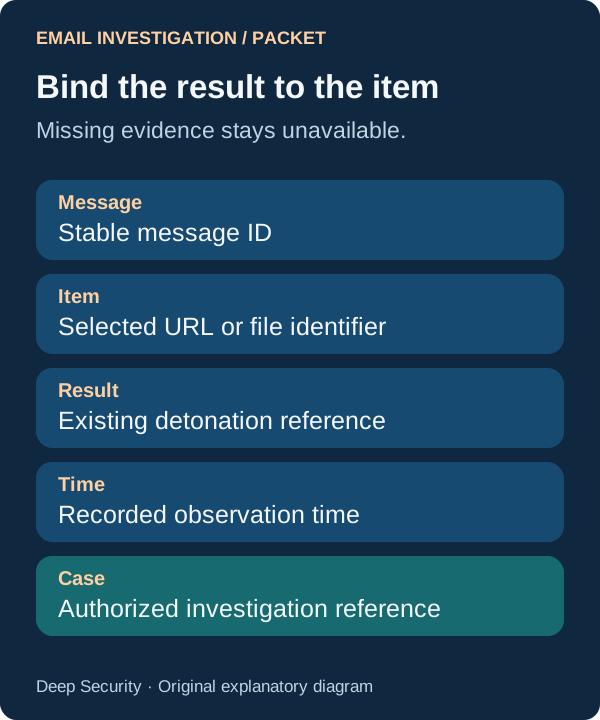
Keep the message identifier, selected artifact, relevant time and case reference together. Use the approved portal workflow and retained results. Do not open a suspicious link in an ordinary browser or execute an attachment on a work device to fill missing evidence.
2. Match each summary claim to the selected artifact
Depending on available data, Microsoft says the summary can explain a verdict, an execution path, relevant indicators and discovered artifacts. Read it alongside the underlying results. Check that the URL, redirect destination or attachment identifier belongs to the item you selected, especially when a message contains several links or files.
For an approved assistant or analyst review note, use this structure: ‘For the selected message and artifact, list each material summary claim, its supporting result or record, and any missing evidence. Distinguish a sandbox observation from an inference. Preserve the recorded times and identifiers. Do not infer a user click, credential submission, successful download or device execution from sandbox behavior alone.’
Expected output is a claim-to-evidence table. Open the cited records and correct the table where the summary compressed a detail or merged two artifacts. A technique label is a useful index to investigate; it is not a substitute for the behavior that supports it.

3. Investigate delivery and user activity separately
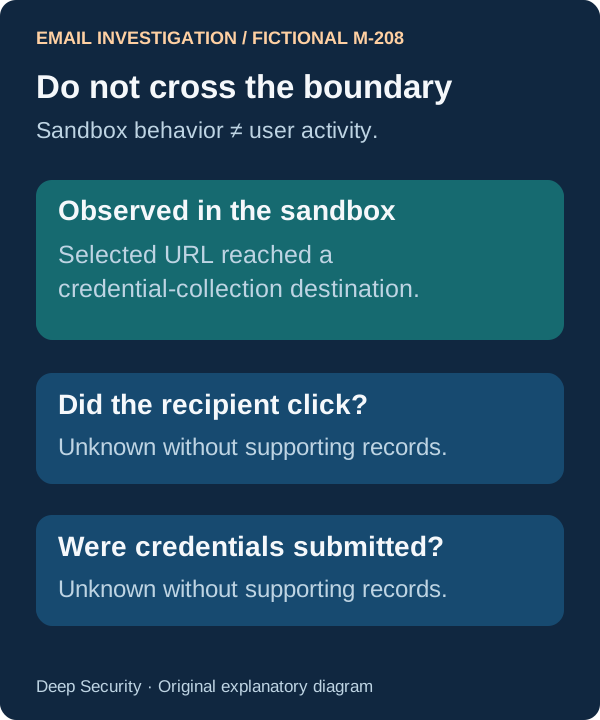
Consider a fictional message M-208 with a URL that reached a credential-collection page during detonation. That supports a statement about the analyzed URL. It does not establish that a recipient clicked it or submitted information. Investigate those questions using the authorized message, click, identity or endpoint records that actually exist in your environment.
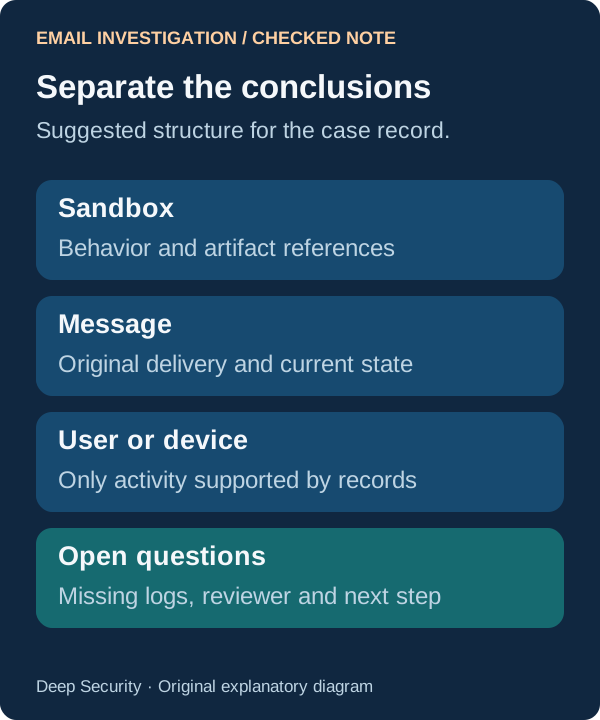
Also distinguish the message’s original delivery outcome from its current location and any post-delivery action. Microsoft’s Email Summary can describe delivery and remediation events when data is available, while Detonation Summary explains the selected sandbox analysis. Read the records behind both instead of treating a current quarantine location as proof of the original delivery state.
If the required activity logs are unavailable, write that limitation and the next evidence request. Avoid converting an empty search, an incomplete time window or an absent telemetry source into a statement that nothing happened.
4. Record a disposition that another analyst can challenge
Write three short findings: what the sandbox observed, what the message records establish, and what user or device activity is supported. Add the source references, unresolved questions, reviewer and time. A useful handoff lets the next person see which conclusion would change if new evidence arrived.
Route any release, containment, mailbox action or user communication through the organization’s existing response process. This article does not propose automating those actions from the AI summary. Preserve the distinction between a proposed next step and an action that was actually taken.
Evaluate the reading aid against your own cases
Try the workflow on a small authorized set of previously reviewed cases. Compare omitted artifacts, unsupported claims, factual corrections and preparation effort using the same evidence. That will show whether the generated narrative improves your handoff. Vendor statements about faster investigation are not measured results from Deep Security.
- No detonation result means unavailable evidence, not a safe message.
- Sandbox behavior and user activity require separate conclusions.
- Keep the reviewer, source records and unanswered questions with the case.
Put the insight into practice.
Deep Security helps organizations assess risk, validate controls, and build a practical plan to strengthen their defenses.
Talk with Deep Security