

A practical rollout guide for evaluating Model Armor v4’s updated indirect prompt-injection, tool-call and jailbreak detection before enforcing it on an AI agent.
What changed on November 12
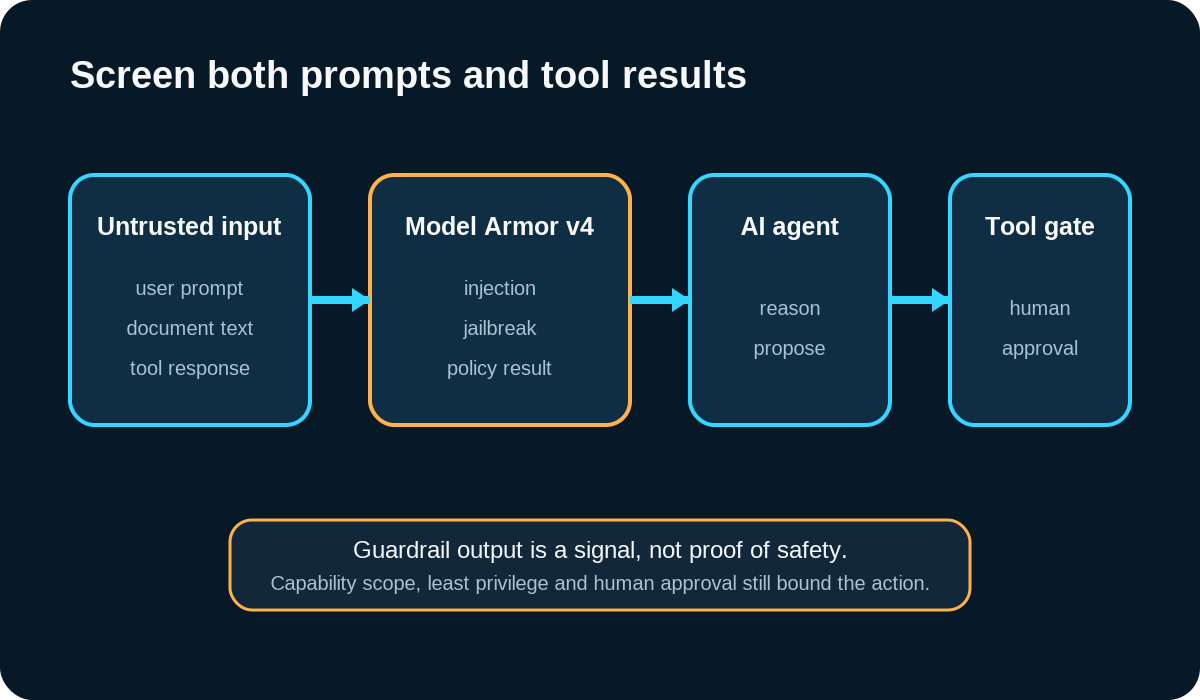
Google Cloud’s Model Armor release notes say filter version v4 under the Latest alias received updated prompt-injection and jailbreak detection on November 12. Google claims higher recall for indirect prompt injection and tool calls, higher recall for conversational input at a lower false-positive rate, and higher recall for jailbreak attacks. The release note does not publish workload-specific benchmark values, so those claims should guide testing rather than become an acceptance threshold.
Model Armor is a Google Cloud service that screens prompts and model responses for risks including prompt injection, sensitive data and harmful content. Google’s overview says processing is stateless unless optional logging is enabled, uses token-based pricing, and has feature and regional limits. It does not maintain context across requests and does not screen audio or video. Deep Security did not test v4, Google Cloud, Promptfoo or the example rollout below.
Who can use it and what to verify first
The update is relevant to Google Cloud teams already using Model Armor templates or evaluating runtime screening for Vertex AI, Gemini or other supported AI applications. The release notes describe v4 under the Latest alias; teams that follow that alias should verify the effective version and change process, while teams that pin versions should explicitly test and promote v4.
Before a pilot, confirm project and region support, IAM roles, endpoint design, data-residency requirements, logging configuration, current token pricing, quota and whether the application screens both user prompts and model responses. Image screening became generally available on November 10 and is priced separately through image-to-token conversion; it is not evidence that every rich-media path in your agent is covered.

- System of record: versioned template, region, IAM, logging, evaluation corpus and change ticket.
- Feature role: emit a screening decision and findings for supported content.
- Application role: enforce least privilege, tool allowlists, timeouts and approval gates.
- Human role: set thresholds, review failures, approve rollout and own rollback.
Step 1: choose one bounded agent workload
Start with a read-only agent that summarizes approved tickets or cloud records and has no production write capability. Inventory every untrusted input path: user text, retrieved documents, web pages, tool output, memory, system messages and model responses. Identify which paths Model Armor will actually inspect and which require separate controls.
Define the harm boundary before testing. For example, the agent may propose a ticket comment but cannot publish it, retrieve unrelated records or call an administrative tool. A guardrail failure must not become an authorization bypass.
Step 2: pin the evaluation inputs and version
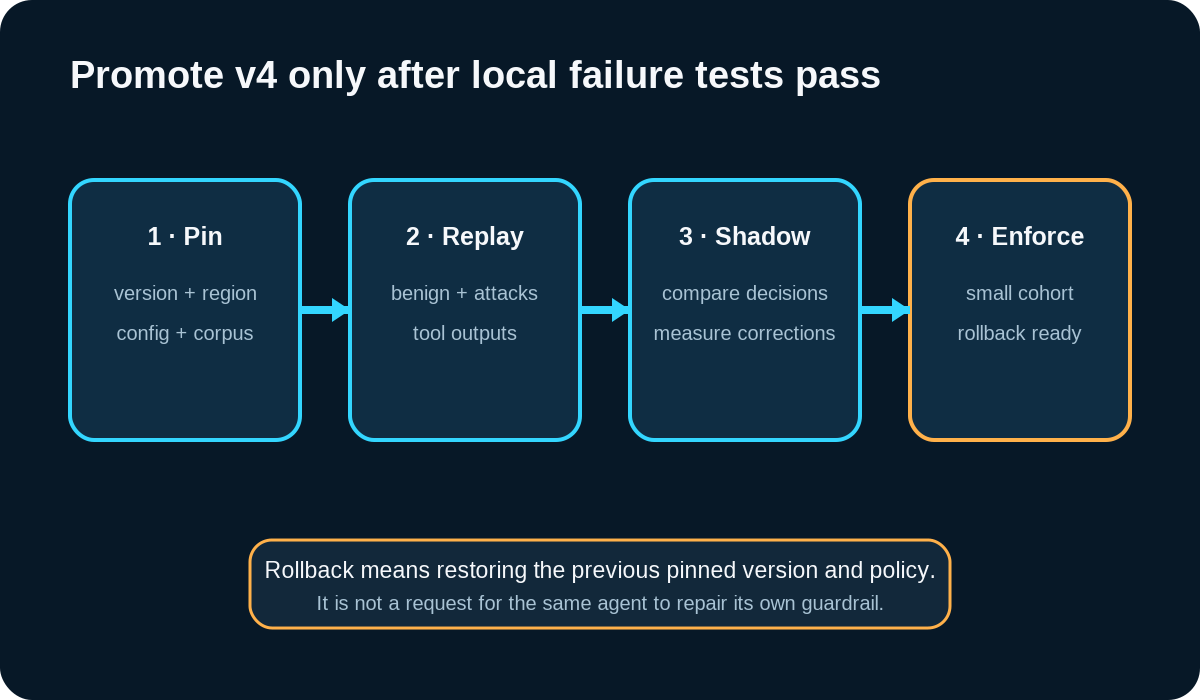
Record the exact Model Armor filter version or alias resolution, template configuration, region, application build, model, tool schema and evaluation-corpus hash. Include representative benign tasks, direct jailbreaks, indirect instructions embedded in documents, malicious tool results, multilingual cases, long conversations and business-specific phrases that may cause false positives.
Promptfoo’s independent guide provides a reproducible starting pattern for Model Armor testing and warns that an assertion can grade the returned guardrail signal without proving that an inspect-only policy blocked the request. Preserve that distinction in your harness: record the filter result, application enforcement result and downstream action separately.
Step 3: score both security misses and business breakage
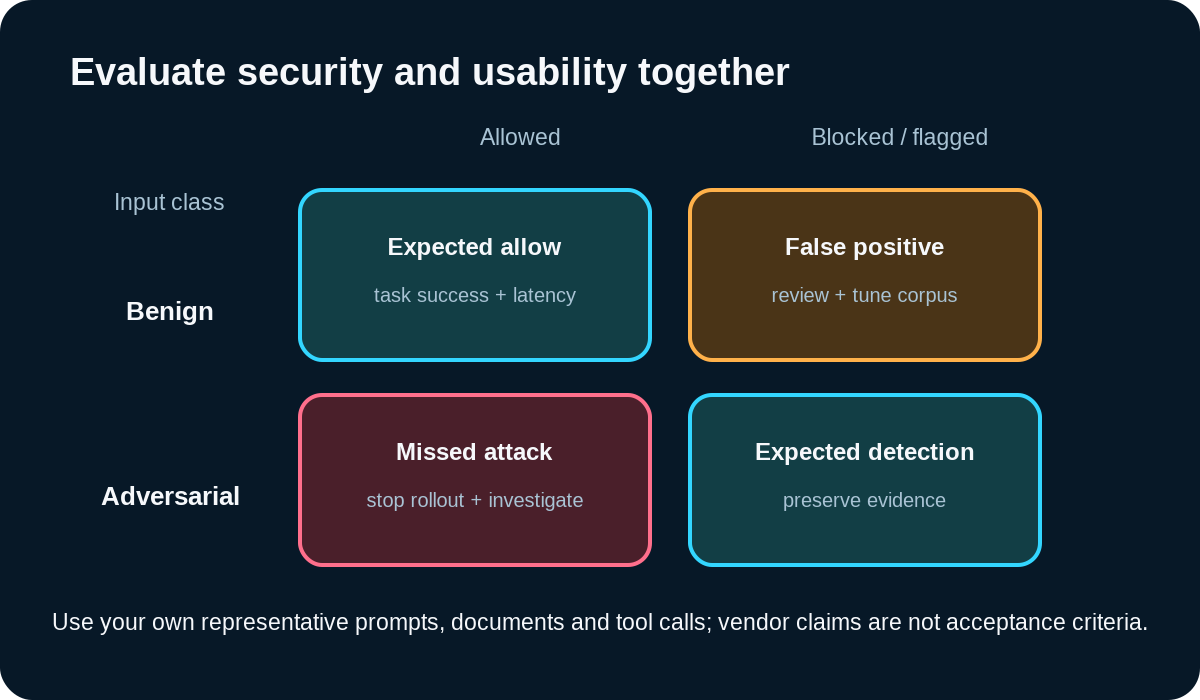
For each test, pre-label whether it should be allowed, flagged or blocked and why. Measure missed attacks, false positives, unsupported content types, latency, reviewer correction and whether an unsafe tool call was still possible. Do not ask the model under test to grade its own safety result.
Use human-reviewed expected outcomes and deterministic assertions for tool calls, data access and writes. A benign request blocked by the filter is an operational failure; an adversarial input allowed through is a security failure. Both need an owner and a reproducible case.
Step 4: run v4 in shadow beside the current policy
Replay the corpus against the current pinned version and v4, then shadow a small slice of live, approved traffic without changing user-visible enforcement. Compare decision changes, false positives, missed indirect injections, tool-result findings, latency and cost. Redact or synthesize sensitive records before they enter the evaluation pipeline.
Example change prompt: “Using only evaluation records T-100 through T-480, compare the current guardrail with Model Armor v4. Return changed decisions, expected label, filter finding, application enforcement, tool-call outcome, latency class, reviewer result and unresolved cause. Cite a test ID for every claim. Do not change the template, enable logging, alter IAM, block live traffic, call a tool or recommend rollout without listing failed gates.”

- Expected output: a cited difference report, not a release verdict.
- Keep raw prompts and sensitive data in the approved evaluation store.
- Calculate rates and thresholds in code, not through free-form model arithmetic.
- Review every newly allowed adversarial case before promotion.
Step 5: enforce with a rollback-ready gate
Promote v4 to a small cohort only after agreed security, usability, privacy, latency and cost gates pass. Keep the previous pinned configuration ready, version the template and application policy together, monitor changed decisions, and name the person who can restore the prior state. If the application used the Latest alias, decide whether that moving alias matches your change-control requirements.
Rollout does not remove the need for tool allowlists, scoped identities, data minimization, approval for consequential actions and post-action verification. Treat the filter as defense in depth, not as an authority boundary.
Realistic limitations and why this topic was selected
A prompt-injection filter can miss novel attacks, flag legitimate instructions, lose context between requests or leave unsupported content unexamined. It cannot restrict an overprivileged tool, validate business authorization, guarantee data residency for every integration or prove an agent’s full behavior is safe. Layered application controls, representative testing and human review remain necessary.
A focused Firecrawl search on November 15 for “Model Armor v4 November 12 2026 prompt injection tool calls coverage” placed Google’s exact release note first, Promptfoo’s test guide second and Google’s product page third; a current Google developer article also recommended screening untrusted content. The exact v4 update has limited independent news coverage, but the primary change and a practical third-party test path are current and directly relevant. Search placement is not proof of popularity, traffic, rank or adoption.
Put the insight into practice.
Deep Security helps organizations assess risk, validate controls, and build a practical plan to strengthen their defenses.
Talk with Deep Security