

A step-by-step guide to piloting the newly available Genesys standalone AI agent deployment model for one bounded customer-service task with tool, handoff, identity and cost controls.
What changed and who can use it
Genesys announced on November 17 that Standalone AI Agents are generally available without a full migration to Genesys Cloud. The company says organizations can connect the agents to an existing contact-center platform, phone system and carrier while using Genesys orchestration, guardrails, policies and human handoff. It also announced Genesys Arena Agent Kits, with general availability later in November, for testing agents against prebuilt tasks and metrics.
Fresh coverage from Unite.AI and Techstrong emphasized the decoupling from a platform migration. The release says consumption uses Experience Units and classifies tasks as simple, moderate or complex based on tool calls; the announcement does not publish a universal dollar price. Confirm contract eligibility, region, integration support, data terms and current Agent Kit availability with Genesys before a pilot.

Pick one practical workload and define the boundary
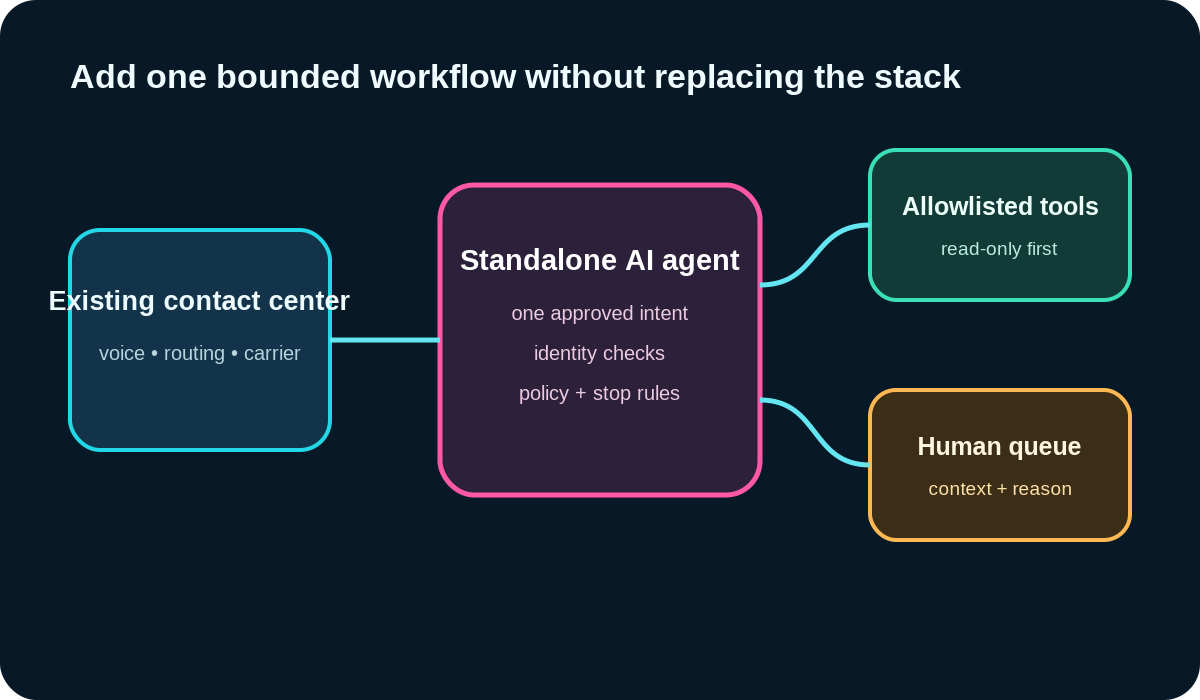
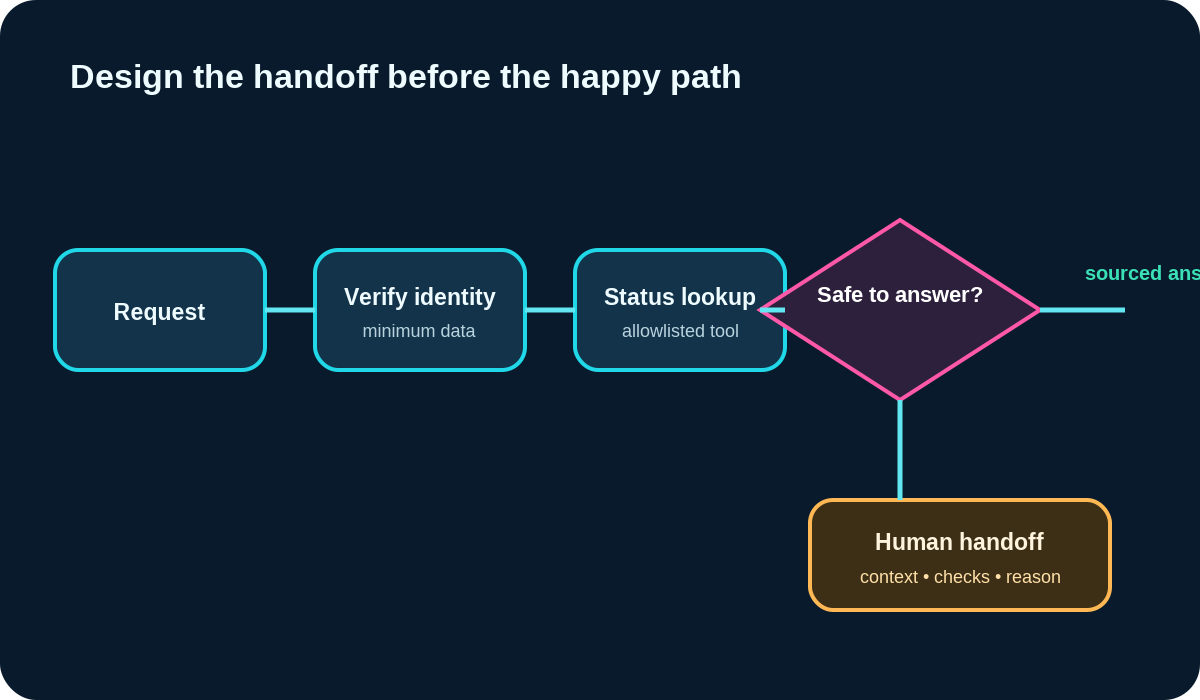
A good first task is order or service-status retrieval for an already authenticated customer, with clear human escalation for exceptions. The AI may confirm the request, perform the approved identity check, call one read-only status tool, explain the result from returned fields and transfer the interaction with context.
It may not change a delivery address, issue a refund, take payment, reset credentials, disclose another customer’s data or improvise when identity or the tool response is uncertain. A pilot needs the current contact-center owner, Genesys integration path, approved identity service, allowlisted business API, transcript policy, human queue, test records, cost budget and an accountable stop owner.
Step 1: write the task and handoff contract
Specify the entry intent, identity evidence, fields the agent may read, tools it may call, maximum calls, response template, prohibited actions, handoff reasons and transcript retention. Define how the receiving human sees customer context, verification state, tool results and the reason for escalation.
Example instruction: “Handle only authenticated order-status requests. Use the approved status tool once with the verified order ID. Answer only from returned status, carrier and estimated-date fields. If identity is incomplete, the tool errors, the order is disputed, the customer requests a change or any field conflicts, transfer to the customer-care queue with the verification result, tool response ID and reason. Never change an order, request payment data or claim a delivery guarantee.”
Step 2: test the policy and tool surface
Build test cases for valid status, partial identity, ambiguous name, another customer’s order ID, tool timeout, stale date, prompt injection in a customer message, repeated call, language change, refund request and emergency escalation. Use synthetic accounts; do not put production customer records into a test harness.
Expected output is a sourced answer or a correct handoff, never a plausible guess. Record intent classification, identity result, tool and arguments, returned fields, policy decision, handoff reason, effort tier and reviewer verdict. Confirm that a tool or carrier failure cannot cause an unverified answer.
- Tool allowlist: one named read-only status operation for the first pilot.
- Identity gate: verification occurs before customer-specific retrieval.
- Cost gate: set a maximum tool-call and Experience Unit budget per interaction.
- Stop gate: a supervisor can disable the workflow without disabling the contact center.
Step 3: run replay, shadow and approved-response stages
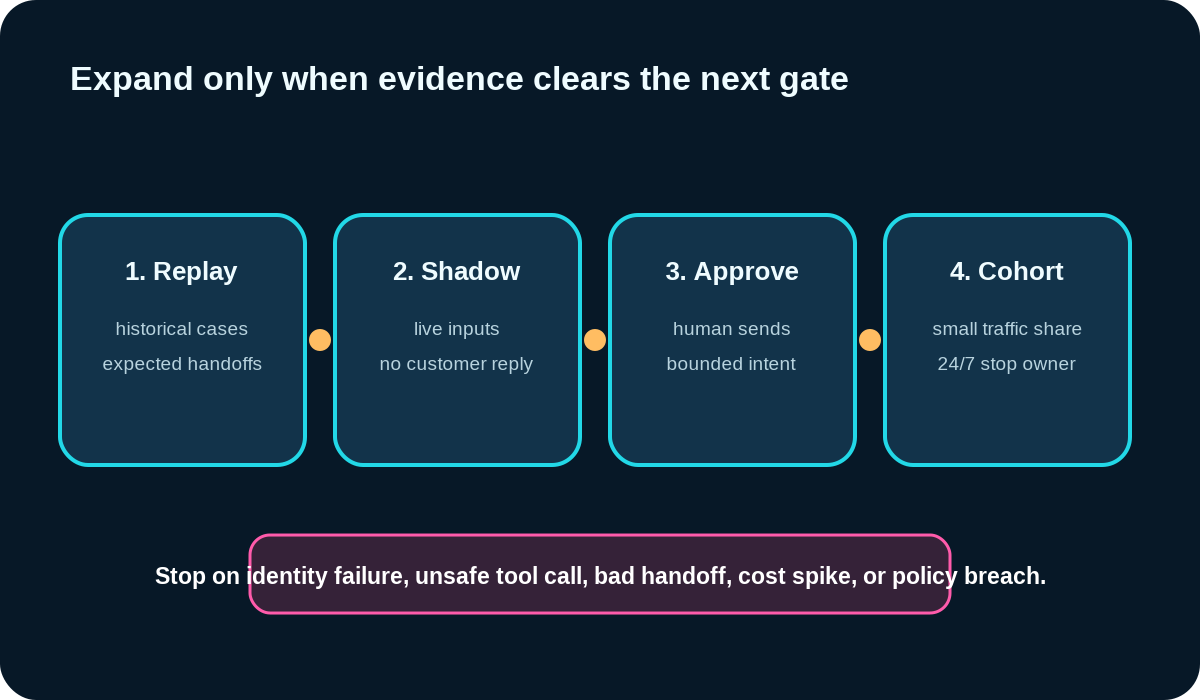
Replay historical sanitized cases and expected handoffs first. Then run shadow mode on live eligible requests without sending the AI answer. Compare with the human resolution, classify mismatches and fix the task contract or retrieval path.
Next allow the AI to draft while a human sends. Only after reviewers understand failure patterns should a small cohort receive direct answers for the bounded intent. Keep refunds, account changes, complaints, accessibility needs and policy exceptions in the human path.
Step 4: approve expansion on service and safety evidence
Track correct-answer rate, identity failures, unsupported claims, unsafe tool attempts, handoff completeness, repeat contacts, customer opt-out, latency and observed Experience Unit tier. Review transcripts under the organization’s privacy and retention policy, and separate customer-service quality from model confidence.
Expand by one intent and tool at a time. Re-run the suite when the model, prompt, tool schema, carrier path or Genesys feature changes. Pause on privacy exposure, bad handoffs, cost spikes, inaccessible experiences, inability to stop the agent or a material rise in human corrections.
Realistic limitations and why this topic was selected
Standalone deployment reduces migration coupling; it does not remove integration, data, telephony, latency, identity, accessibility or governance work. Effort-based charging can be harder to forecast when conversations branch or tools retry. A human handoff can still fail if routing, context transfer or staffing is weak. No public announcement proves performance in your environment.
A focused Firecrawl search on November 18 for “Genesys Standalone AI Agents Arena Agent Kits November 17 2026” returned the official announcement first and same-day or following-day coverage from Unite.AI, Techstrong and other publications. That independent cluster showed current attention and a concrete workload relevant to Deep Security’s customer and web-operations readers. Search placement is not proof of traffic, adoption, customer outcome or Google rank.
Put the insight into practice.
Deep Security helps organizations assess risk, validate controls, and build a practical plan to strengthen their defenses.
Talk with Deep Security