

A step-by-step pilot for using the newly GA Databricks Genie app in Slack to assemble cited vulnerability exceptions while controlling permissions, visibility and ticket actions.
What changed and who can use it
Databricks announced general availability of Genie in Slack on November 12. The company says users can DM Genie or mention it in a channel, ask permission-aware questions, work with files, schedule analyses and approve connected-tool actions. Requests run under the asker’s permissions, with Unity Catalog and source permissions applied. Replies can cite sources and continue in Databricks for more context.
This is narrower than treating every newly described Genie capability as generally available. Databricks separately announced a broader always-on Genie direction on November 11; independent coverage says some always-on, search and management capabilities are preview or beta. The Slack app itself is GA, but it still requires a Databricks environment, configured sources and Slack administration. The reviewed announcements did not publish standalone feature pricing. Deep Security did not test Genie, Slack, Unity Catalog or connected tools.
A practical workload: vulnerability exception review
A useful first workload is a vulnerability exception brief: assemble the finding, affected asset, service owner, remediation ticket, compensating control, risk acceptance, expiration date and latest scan into one cited review packet. The work is repetitive, cross-system and discussion-heavy, yet the final decision belongs to an accountable security or business owner.
The pilot needs a Databricks workspace, Genie in Slack configured by authorized administrators, Unity Catalog and connected-source permissions, a curated exception dataset or view, a read-only ticket connector at first, audit logs and a named reviewer. Do not start with broad chat history, production write access or every security data source.

- AI role: retrieve permitted records, cite them, expose conflicts and draft decision options.
- Human role: validate asset and owner, approve risk, set expiration and authorize any ticket update.
- Private default: limit the response audience until the data classification is proven safe.
- Stop condition: unintended disclosure, uncited claim, stale scan, missing owner or attempted write without approval.
Step 1: configure audience safety before source access
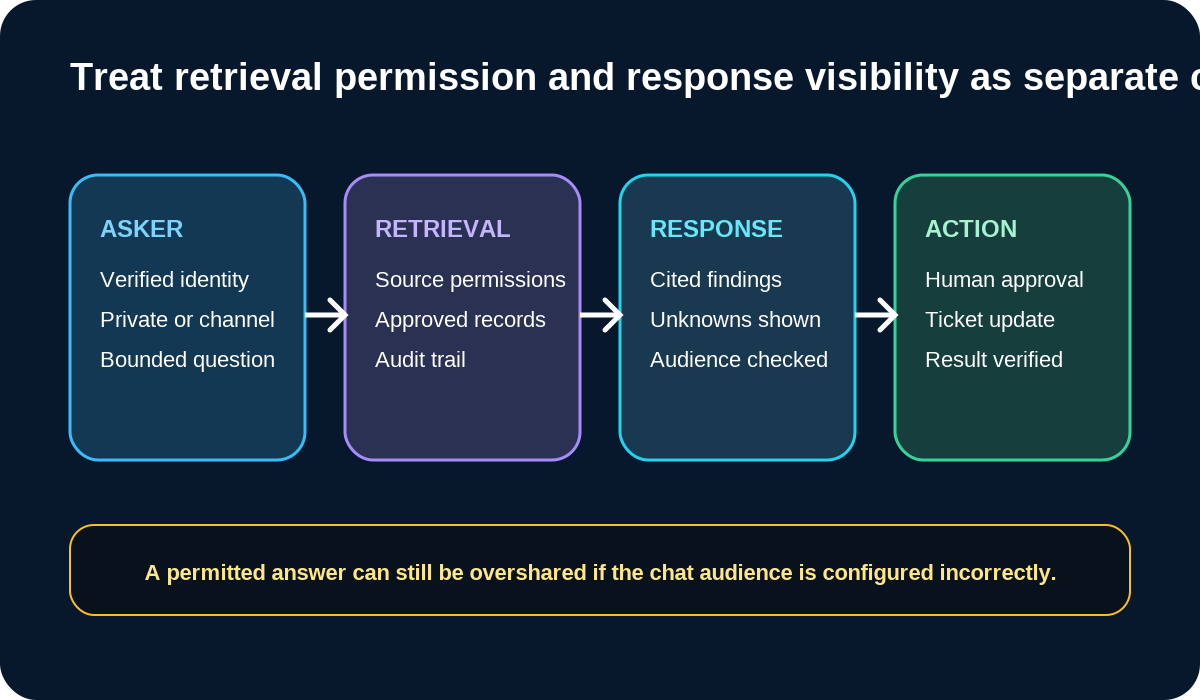
Independent coverage highlights a subtle control: the asker’s permissions govern what Genie may retrieve, while Slack visibility determines who can see the resulting answer. A public response can be visible to channel members who lack the underlying data permission. Set workspace and channel defaults deliberately, begin with private responses and test with accounts that represent real permission boundaries.
Document which setting wins when personal, channel and workspace controls differ. Unite.AI notes that charts do not appear when response visibility is private, so evaluate whether that limitation affects the pilot rather than weakening privacy to recover a visual. Record admins, approved channels and the emergency disable path.
Step 2: curate a minimal governed source set
Create a narrow governed view containing exception ID, finding ID, asset, owner, business service, severity, exploit evidence, control, decision, approver, created time, expiration and source links. Keep raw secrets, credentials, private chat and unrelated ticket fields out. Test row- and column-level controls with multiple identities.
Add data-quality rules for missing owners, expired exceptions, stale scans and contradictory ticket states. The model may explain those failures, but deterministic checks should decide whether the record is complete enough for review.
Step 3: use a response contract that fits the decision
Ask for a compact review packet rather than an open-ended recommendation. Require every factual statement to cite the governed record and make unknowns as visible as findings. Avoid sharing the output to a channel until the response has passed privacy and audience tests.
Example prompt: “For exception EX-204, use only governed records E-600 through E-645. Return scope, affected asset and service, owner, current finding, exploit evidence, compensating control, open remediation ticket, expiration, conflicts and missing proof. Provide approve, reject, reduce-scope and request-evidence options. Cite a source for every factual line. Do not update a ticket, change a risk decision, mention unrelated records or claim the vulnerability is remediated.”

Step 4: put connected-tool actions behind explicit approval
After the read-only pilot demonstrates safe retrieval and useful citations, connect one noncritical ticket action such as adding a draft review note. Require an explicit human approval, show the exact target and proposed change, apply an idempotency key, log the result and read the ticket back to verify it. Do not allow the assistant to accept risk, close findings or extend expiration dates.
Use a separate service identity with the minimum scope instead of borrowing a reviewer’s full session. Rehearse revocation and rollback. The final reviewer should see the original evidence, proposed write and post-action result in one place.

Step 5: stage the pilot and measure corrections
Begin with synthetic records in private DMs, then shadow real reviews without writing. Measure citation coverage, wrong-record retrieval, missing conflicts, unsafe audience exposure, reviewer corrections and time spent locating evidence. Only after the rollback is proven should a named team use a controlled channel or one approved connector action.
Do not reuse vendor benchmark claims as your acceptance threshold. Databricks reports benchmark results for Genie Ontology, but they do not establish accuracy, privacy or cost for this exception workflow. Your own representative records and failure tests are the relevant evidence.

Realistic limitations
Source permissions do not automatically make a public chat response safe. The assistant can cite a stale record, omit a conflicting ticket, reveal a permitted answer to the wrong channel, create noisy scheduled work or propose an action whose downstream effect is larger than it appears. Data classification, audience controls, least privilege, audit and human review remain necessary.
General availability does not mean every broader Genie capability is GA or included at no additional cost. Confirm workspace eligibility, regional and compliance requirements, connector scope, preview status and current pricing with Databricks before production use.
Why this topic was selected
A focused Firecrawl search on November 14 for “Databricks Always-on Genie November 12 2026 coverage availability pricing” placed Databricks’ primary announcement first and surfaced same-week coverage from Techzine, MLQ, SD Times, Unite.AI and Fortune. The November 12 Slack GA provides a concrete available feature, while the independent coverage exposes practical visibility and preview-status questions. Search placement is an attention signal, not proof of traffic, ranking or adoption.
Put the insight into practice.
Deep Security helps organizations assess risk, validate controls, and build a practical plan to strengthen their defenses.
Talk with Deep Security