
What changed in Cisco AI Canvas, who can use it, prerequisites, limitations and a step-by-step workflow for investigating application-access or video-call failures.
What changed and why it matters
Cisco published updated Cloud Control Canvas documentation on October 29 and getting-started guidance on October 30. On November 6, Cisco announced that collaboration telemetry in Cloud Control can feed Splunk while AI Canvas pulls ThousandEyes and Meraki insights together for cross-domain troubleshooting. The fresh announcement and documentation make this a materially updated practical workflow, not just a product mention.
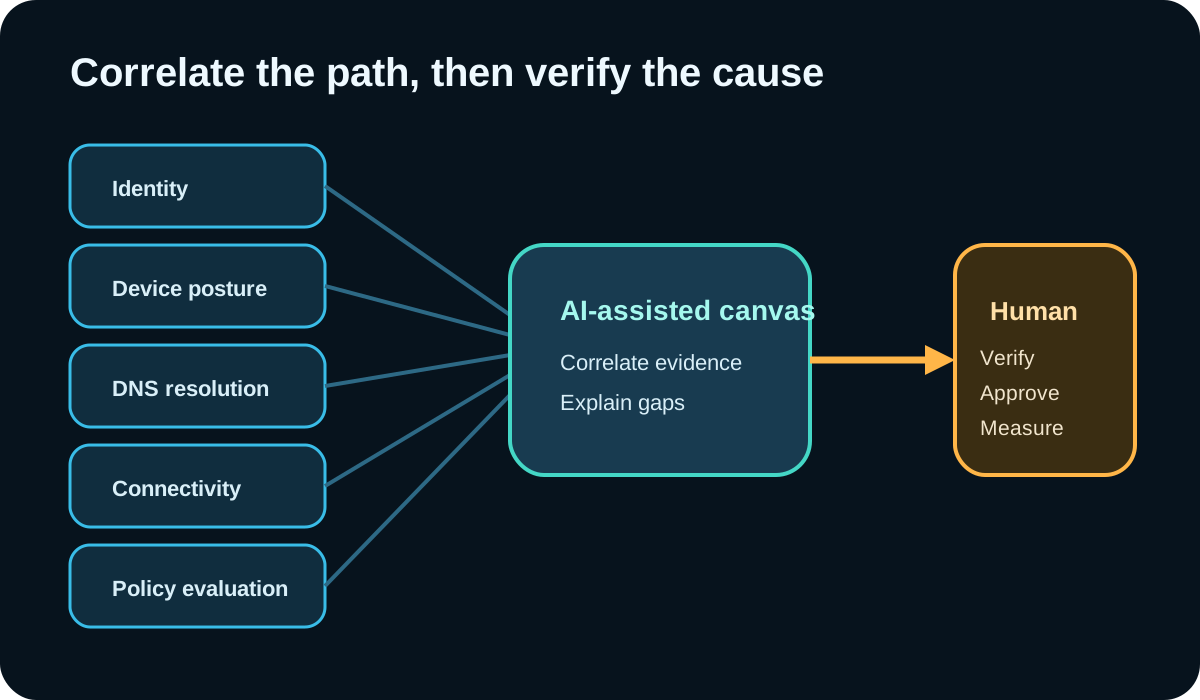
The useful change is the investigation surface. Cisco documents prompts for private- and public-application access, firewall activity, VPN troubleshooting and other product workflows. For a private-application failure, the system can examine user identity, device posture, DNS, connectivity and policy evaluation. That can reduce manual swiveling, but the result is still a hypothesis assembled from the data and permissions available to the user.
Who can use it and what must be enabled
AI Canvas is part of Cisco Cloud Control and depends on access to the integrated products and their data. Cisco’s documentation says AI Features must be enabled in ThousandEyes. For Splunk Cloud integration, the stack must run version 10.5 or later on US Commercial AWS, the relevant apps must be installed, and roles that need Canvas access require the documented MCP execution capability.
Permissions still matter: a user needs access to each relevant product, data source and environment. Cisco’s documentation says one environment is selected per product for a prompt and does not describe comparing multiple environments of the same product in one prompt. Licensing and entitlements vary by product and tenant; administrators should confirm the current Cisco order, subscription and regional terms rather than assuming this article grants access.
- Enable only the AI and product integrations needed for the pilot.
- Use least-privilege roles and a non-production test group first.
- Confirm data residency, retention and audit requirements with your contract.
- Document which environment each product contributes to the investigation.
A real task: diagnose a regional video-call failure
Use a bounded incident such as users in one office reporting dropped video calls during a 30-minute window. The intended audience is a network or collaboration engineer with authorized read access to the relevant Cloud Control, ThousandEyes, Meraki, identity, security and Splunk data. Start by recording the user impact, time window, locations and a known-good comparison group.
Cisco told investors that one enterprise engineer used AI Canvas after spending hours troubleshooting dropped calls and that the system identified an access point and next steps within minutes. Treat that as a Cisco-reported customer example, not an independent benchmark or a guaranteed outcome.

Step 1: write a bounded prompt
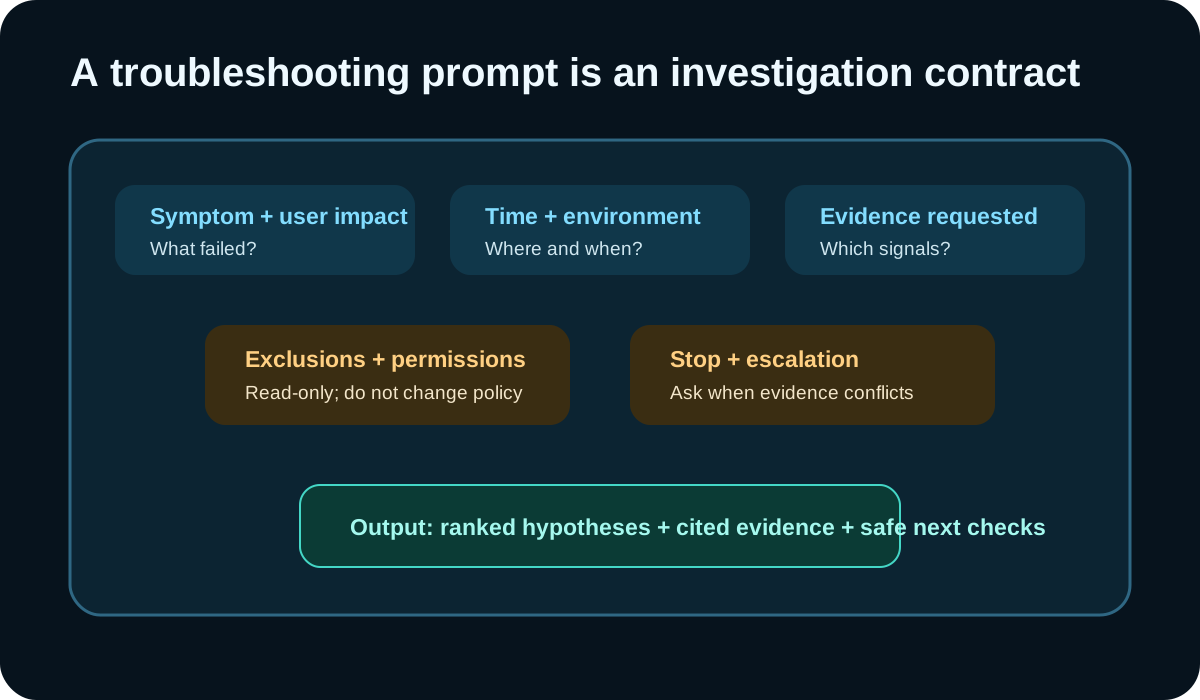
A useful prompt names the symptom, affected group, time window, selected environments, evidence sources, exclusions and stop condition. Ask for ranked hypotheses with supporting and contradictory evidence. Keep the first pass read-only and prohibit configuration changes.
Example prompt: “Investigate video-call drops for OFFICE-07 from 09:00–09:30 local time. Compare affected clients with the approved healthy peer group. Use only the selected Meraki, ThousandEyes, identity, Secure Access and Splunk environments. Return ranked hypotheses, cited events, contradictory evidence, confidence and safe read-only checks. Do not change policy or configuration. Ask before using another environment.”
Step 2: challenge the first explanation
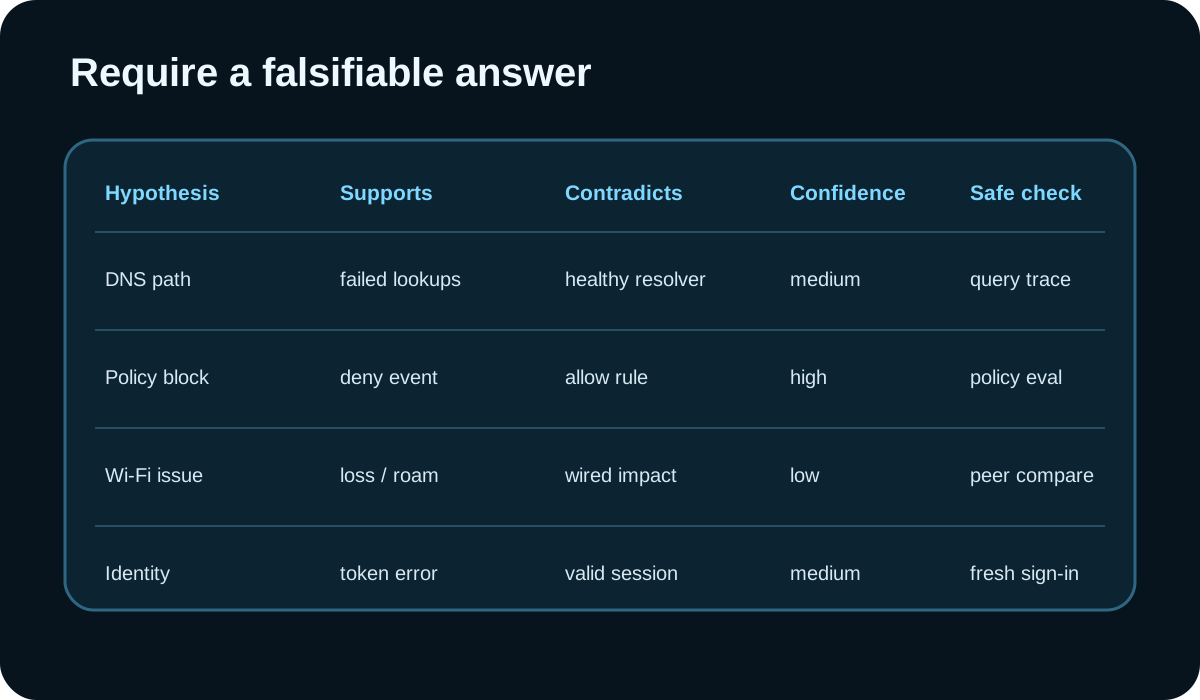
Review the generated cards, tables, timelines and cited events. Ask which evidence would falsify the leading hypothesis. Compare an affected client with a healthy peer and inspect the original product record before accepting a root cause. If two products disagree on time or identity, resolve that conflict rather than asking the model to smooth it over.
Cisco’s documentation notes limitations including a beta Workflows agent, one selected environment per product, and situations where inventory queries can return empty tables despite counts. Treat missing widgets as missing evidence, not proof of absence. Duplicate a locked session only if the documented authentication workaround applies, and record why.
Step 3: approve the smallest safe change
Once the original telemetry supports a cause, move the recommendation into the normal change process. Name the owner, expected effect, rollback, observation window and success signal. Prefer the smallest reversible change and retain the pre-change evidence. Re-run the same bounded comparison after the change.
Do not let a fluent explanation bypass network, identity or security approvals. If the proposed action changes firewall, access, routing or wireless policy, use the product’s audited workflow and separation of duties. The value of AI Canvas is faster correlation; accountability remains with the operators.

Measure the pilot without inventing savings
For the first ten investigations, record time to first supported hypothesis, number of source systems opened manually, unsupported claims, missing-data escalations, changes proposed, changes approved and whether the issue recurred. Compare against similar incidents, not a vendor anecdote. A faster answer is useful only if the evidence and outcome hold up.
This article did not test AI Canvas, Cisco licensing or a production network. Product behavior can change, and results depend on telemetry quality, integrations, permissions and selected environments. Validate current availability with Cisco and test in your own tenant. Do not upload restricted incident data merely to reproduce the workflow.
Why this feature was selected
A focused Firecrawl search on November 8 returned Cisco’s updated Canvas and getting-started documentation, Cisco’s November 6 announcement, and a recent Fortune earnings transcript carrying a concrete troubleshooting example. The results show current public attention and a practical information gap around prerequisites, evidence quality and safe use. They do not prove market adoption, performance, search volume or rankings.
Put the insight into practice.
Deep Security helps organizations assess risk, validate controls, and build a practical plan to strengthen their defenses.
Talk with Deep Security