

A practical rollout guide for AWS Emulator’s November 11 release, including local coding-agent tests, fidelity gaps, telemetry, IAM limits and real-cloud promotion gates.
What AWS released and who can use it
AWS announced AWS Emulator on November 11 as a generally available local emulator that accepts AWS SDK and AWS CLI requests over a local HTTPS endpoint. AWS says it has no additional service fee; normal AWS charges apply only when resources are deployed to AWS. Source code is published under the CC0 1.0 public-domain dedication.
Linux users can install RPM or Debian packages. On macOS and Windows the launch post instructs users to build and run a Docker image; AWS does not publish a ready-made image. The standalone process generates emulator credentials, configuration and a certificate. A Rust-only embedded mode can create isolated emulator instances inside tests. Deep Security did not install or benchmark the release, so the workflow below is a deployment pattern based on the dated documentation—not a tested performance claim.

The critical security boundary
For supported operations, AWS says the emulator is intended to return the same valid results and invalid-call errors as AWS; unsupported operations return HTTP 501. Resource state is in memory and each process gets its own port, keys and state. The launch post says the process listens only on the local machine by default and requires requests signed with its generated keys.
AWS also states that the emulator does not evaluate IAM and resource-based policies the way AWS does. A request denied in AWS may succeed locally. Each emulator acts as one account with no cross-account or cross-Region behavior, and fidelity varies by service and feature. GeekWire’s November 11 coverage additionally noted analyst concerns around throttling, outage simulation, regional differences and unsandboxed code.
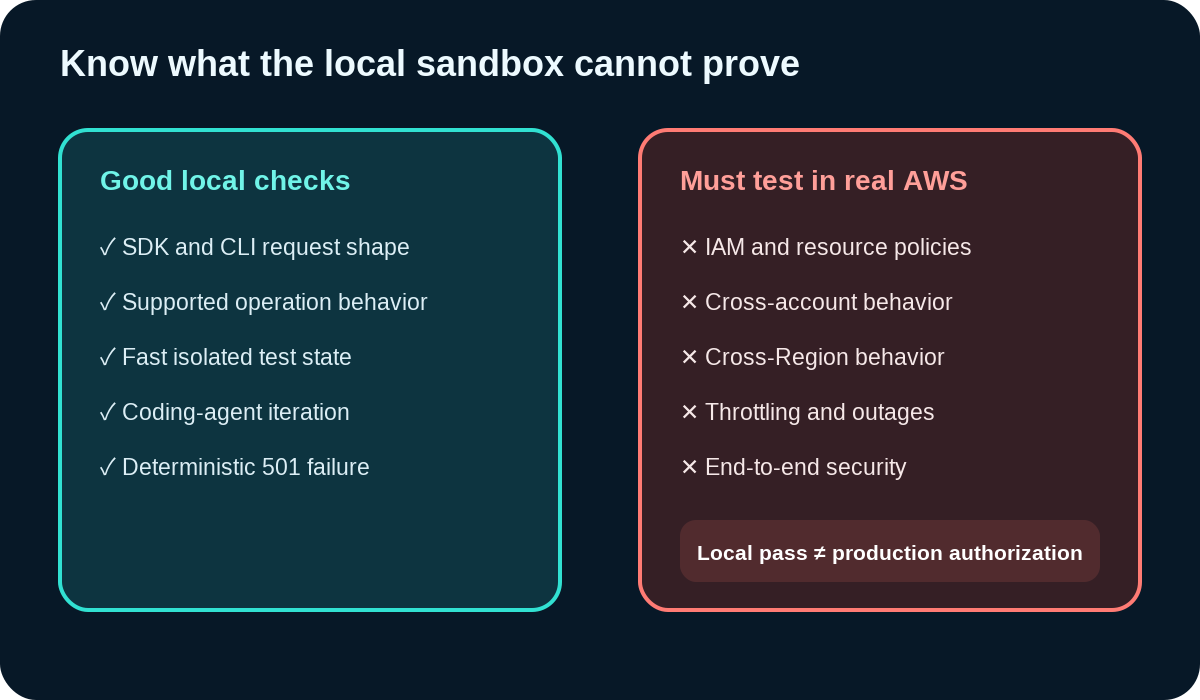
- Use it for fast API behavior checks and isolated coding-agent iteration.
- Do not use it to prove authorization, network policy or production security.
- Keep actual AWS credentials and customer data out of emulator jobs.
- Check the current fidelity report and public known gaps for every service used.
Step 1: define a small pilot and isolate it
Choose one repository and one workload that uses a small set of supported APIs, such as creating a DynamoDB table and reading a test item. Pin the emulator version or source commit, record the services and operations, inspect the fidelity report, and keep the pilot in a disposable developer or CI environment. Do not expose the endpoint beyond the local host.
Install the documented package on Linux or build the documented Docker image on macOS or Windows. Start a fresh instance for each agent or test shard so state cannot bleed between runs. Review whether anonymous usage and error telemetry is acceptable; AWS says it is on by default and can be turned off.
Step 2: point only the test process at emulator credentials
Use the emulator-generated endpoint, configuration, certificate and keys only inside the test shell or job. Remove real AWS credentials from that environment rather than relying on the agent to choose the correct profile. Some SDKs require an additional trust-store setting for the local certificate; follow the current SDK-specific documentation.
Give the coding agent the repository, approved test command, service list, allowed files and a no-network rule. Example prompt: “Implement issue EMU-42 using only files under src/demo and tests/demo. Run the approved test command against the current local emulator endpoint. Return the diff, operations called, emulator version, test evidence, any 501 or fidelity gap and the smallest next step. Do not access real AWS, read non-emulator credentials, change IAM, install unapproved packages, merge code or claim production readiness.”
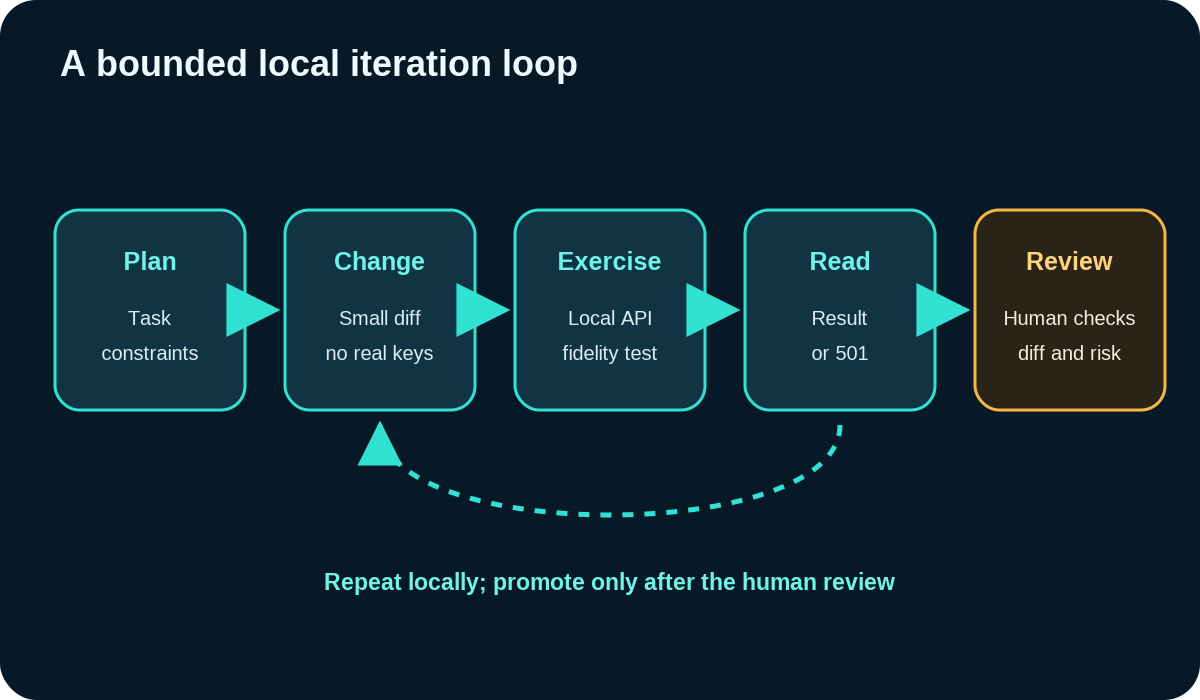
- Expected output: a reviewable diff plus cited local test evidence.
- Stop on HTTP 501, unexpected outbound access or an unsupported service behavior.
- Treat generated credentials as local-only; never replace them with production keys.
- Record the emulator version, agent model, prompt, commands and result.
Step 3: review the diff and test fidelity, not just success
A human reviewer should inspect code, dependencies, error handling, data boundaries and every AWS operation invoked. Compare the operation list with the fidelity report and known gaps. A green test can still exercise only the happy path or miss a production-only authorization failure.
Add negative cases for invalid input and missing resources. Where the emulator returns 501 or differs from AWS, mark the gap explicitly instead of mocking it away silently. If the operation is security-sensitive, move it to the isolated real-cloud stage.
Step 4: promote through an isolated real AWS test account
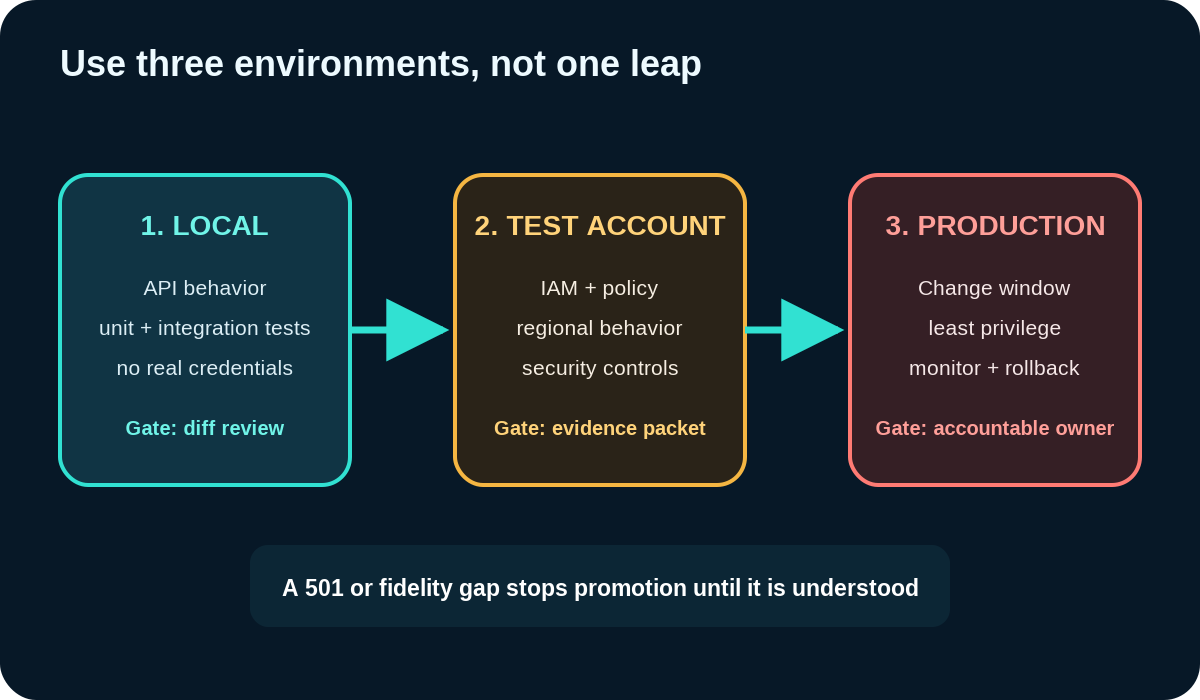
After code review and local checks, run the same workflow in a dedicated AWS test account with least-privilege roles, budget limits, logging, network controls and disposable data. This is where IAM, resource policies, regional behavior, service quotas, throttling and end-to-end security must be evaluated.
Require a change owner to compare local and real-cloud results, document discrepancies and approve the production plan. Production rollout still needs the normal change window, monitoring, rollback and incident ownership; the emulator does not replace them.

Step 5: make the promotion evidence explicit
Keep three separate result sets: local emulator behavior, isolated AWS behavior and production rollout evidence. Record API calls, versions, tests, policy evaluations, security checks, owner, approval, monitoring and rollback trigger. A pass in one environment never overwrites a failure or unknown in another.
If the emulator updates continuously, retest pinned workloads before adopting a new version. Track fidelity changes as dependency changes. The public source and known-gap history are useful inputs, but they do not shift accountability away from the application owner.
Realistic limitations and why this topic was selected
AWS Emulator cannot reproduce every service behavior, authorization rule, region, quota, outage or network condition. It may create false confidence, and a coding agent may still write vulnerable logic, access the wrong files or optimize for the emulator rather than the application. Version pinning, least privilege, network isolation, code review, real-cloud tests, security assessment and monitored rollout remain necessary.
A focused Firecrawl search on November 16 for “AWS local cloud emulator AI coding agents November 2026 official GitHub release” returned AWS’s November 11 release announcement and What’s New entry in the first two positions, followed by dated coverage from GeekWire, Cloud Computing News and other outlets. That concentration of primary and independent results established current attention. Search placement is not proof of traffic, Google rank, adoption or DeepSecurity.io performance.
Put the insight into practice.
Deep Security helps organizations assess risk, validate controls, and build a practical plan to strengthen their defenses.
Talk with Deep Security