

A human-reviewed workflow for prioritizing password, 2FA and passkey recovery after mSecure’s November 2026 security notice without exposing secrets to an AI model.
The practical problem: hundreds of secrets, no safe alphabetical order
A November 3 mSecure support notice recommended immediate steps to protect confidential information stored in the application, potentially including changing passwords, resetting or re-enrolling two-factor authentication, and removing existing passkeys. The notice left customers asking how broadly those actions applied. The Register and The Hacker News independently reported the notice and the lack of detailed public incident information.
A large vault can contain hundreds of records. Rotating them alphabetically wastes the first response window on low-impact accounts while a primary email address, domain registrar or tenant administrator still controls recovery for everything else. An approved AI assistant can sort redacted metadata into a recovery queue, but the assistant must never receive the secrets themselves.
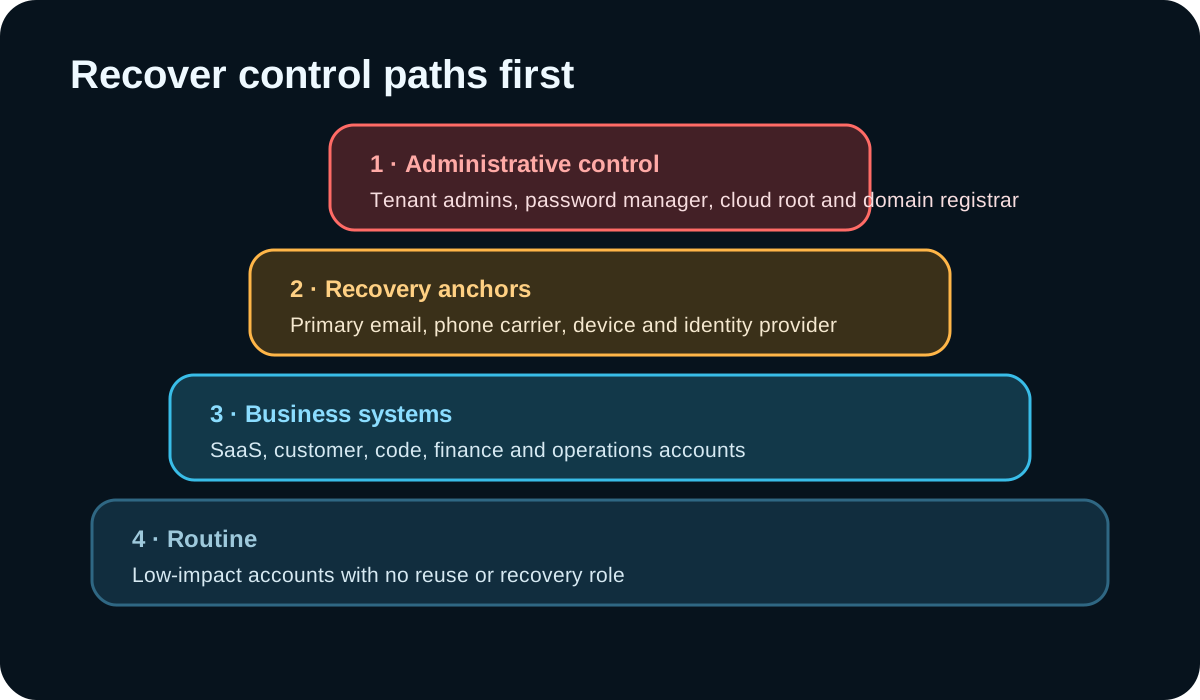
Build the safe input set
This workflow is for individuals, security teams and IT administrators responding to the notice. Work from a clean, patched device. Preserve the notice and your decision log. Create a redacted inventory with account ID, service category, business owner, administrative role, recovery email domain, presence of 2FA, presence of passkeys, session-revocation support, credential reuse status, business impact and last verification date.
Do not export or paste usernames when they identify a person unnecessarily, passwords, vault notes, TOTP seeds, backup codes, private keys, passkey material, recovery codes, full URLs containing tokens or personal identity documents. Use placeholders such as ACCOUNT-014 and keep the private lookup table offline.

Step 1: ask for a control-path priority score
Ask the assistant to score only from the redacted fields. Administrative control, recovery power, credential reuse, customer or financial impact, and evidence of exposure should raise priority. An unknown should remain unknown rather than becoming a guessed low risk.
Example prompt: “Create a recovery queue from this redacted account inventory. Put identity providers, primary email, domain registrar, cloud root, password manager and tenant administrators first. Then rank business-critical systems and accounts with reused credentials. Return account ID, reasons, prerequisites, recommended action, owner, verification evidence and unresolved questions. Do not request or infer secret values.”
- Expected output: a queue with one row per account and an explicit reason.
- Require prerequisites so an email account is secured before accounts that recover through it.
- Flag shared and service accounts for coordinated change windows.
- Separate vendor guidance from the team’s risk-based expansion of scope.
Step 2: run one verified recovery loop at a time
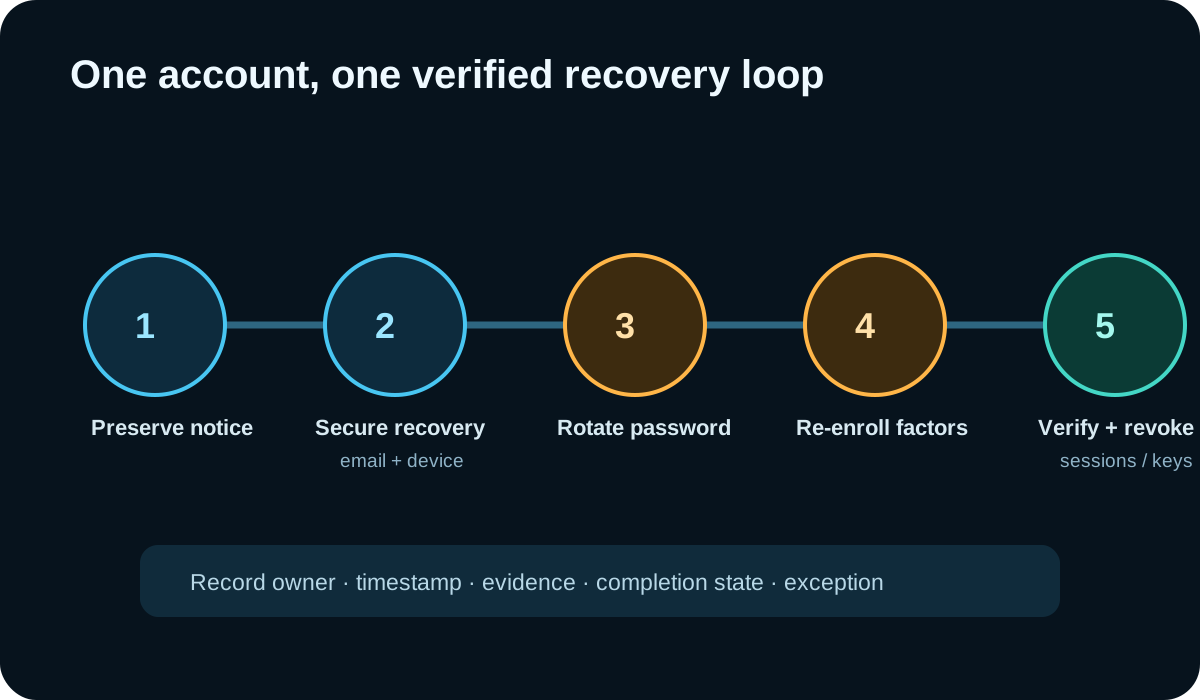
For each account, verify the official service URL independently, secure its recovery channel, generate a unique password, re-enroll factors when required, replace passkeys when in scope, revoke old sessions or app passwords, and test the new recovery path. Record timestamps and evidence without storing the new secret in the ticket.
The mSecure notice uses conditional language—actions may include password, factor and passkey changes—and public details remained limited when researched. Use the vendor’s current guidance and your incident lead’s scope. Do not turn an ambiguous notice into an unsupported claim that every stored credential was exposed.
Use a clean recovery environment
A rotation campaign can fail if new credentials are created on an untrusted device or immediately stored back into an environment under investigation. Use a patched device, verify the password-manager application source, protect the primary email and device account first, and keep incident communications out of compromised channels when that risk exists.
If the organization uses single sign-on or managed devices, coordinate with the identity and endpoint teams before revoking sessions or factors. A rushed factor reset can lock out responders or break service accounts. AI can draft the order and change-window checklist; people who own those systems approve the sequence.

Step 3: verify the old access is gone
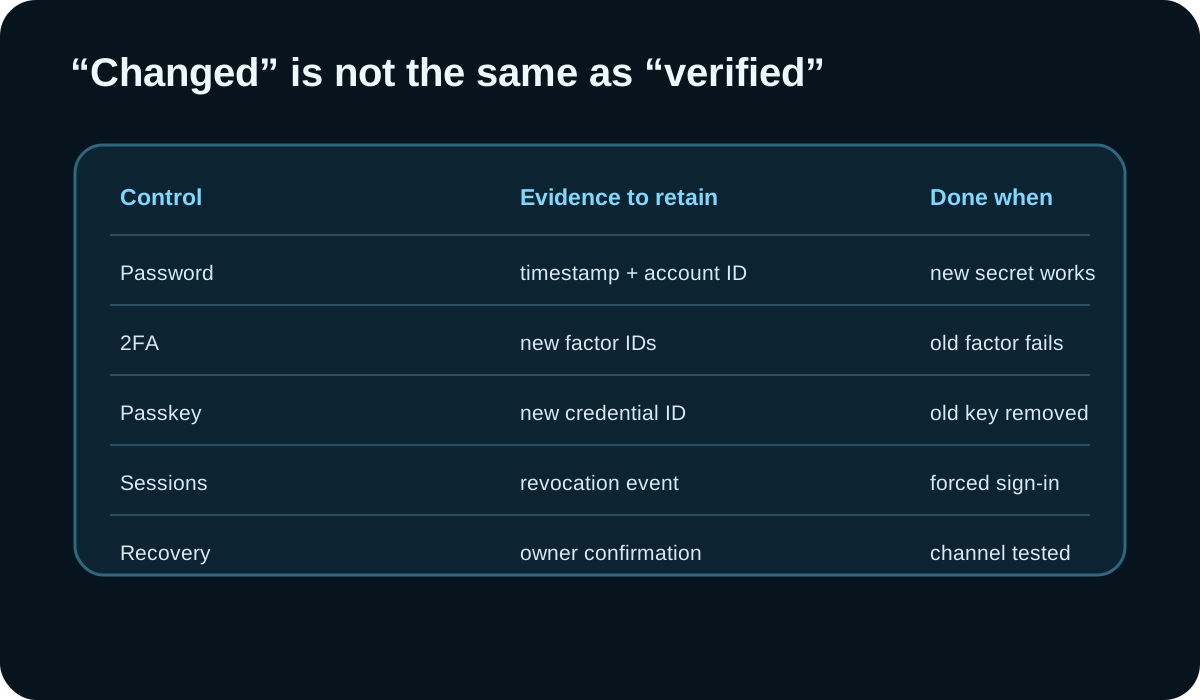
A successful password change does not prove old sessions, app passwords, API keys, backup codes or passkeys were revoked. Track each control separately. Where the service exposes an authentication log, confirm the change and investigate unfamiliar activity. Where it does not, record the limitation and use the strongest available verification.
Have a second person review high-impact accounts. Sample completed routine accounts for quality. Ask the assistant to find incomplete rows and contradictory completion states, but do not let it mark tasks complete from prose alone.
Limitations and scope
This workflow was not tested against a real mSecure vault and does not determine what happened in the incident. Publicly available information did not fully explain the suspicious activity, exactly which customers or data were affected, or whether every listed action was required for every account. The support thread included a response saying users who had moved away from mSecure Cloud sync at least two years earlier were not affected, but customers should verify their own status with current vendor guidance.
AI can mis-rank an account, miss a recovery dependency, expose sensitive metadata through an unapproved service, or produce a false sense of completion. Keep the model input minimal, the queue reviewable and the actions manual. If secrets may have been reused outside the inventory, expand the search deliberately rather than assuming the queue is complete.
Why this topic was selected
A focused Firecrawl search on November 8 returned the November 3 mSecure support notice and prominent same-week coverage from The Hacker News, TechRadar and The Register. The repeated practical question was how to handle passwords, factors and passkeys at scale when the public scope remained unclear. That is a current search-result signal, not evidence of search volume, confirmed vault exposure or this article’s traffic.
Put the insight into practice.
Deep Security helps organizations assess risk, validate controls, and build a practical plan to strengthen their defenses.
Talk with Deep Security