

A practical, human-gated workflow for using AI to separate Microsoft 365 service-health evidence, local checks and outage-themed phishing into a cited incident brief.
Why Microsoft 365 outage triage is a timely AI use case
Microsoft investigated a widespread Microsoft 365 disruption beginning November 12. BleepingComputer reported impacts across Exchange Online, Teams, SharePoint Online, Microsoft 365 Copilot and Microsoft Defender XDR under tenant advisory MO1550821, while Microsoft’s public status page remained the primary place to check current service health. By November 13, independent coverage described sustained recovery with some degradation still visible.
The operational problem is not simply deciding that Microsoft is down. A managed IT or security team must distinguish vendor-wide symptoms from a local identity, DNS, network or configuration fault; identify the affected users; communicate a safe workaround; and resist outage-themed credential phishing. Field Effect documented password-reset and fake-support lures appearing during the incident. Deep Security did not test Microsoft’s incident, affected tenants or the AI workflow below.
Audience, tools and a deliberately narrow AI role
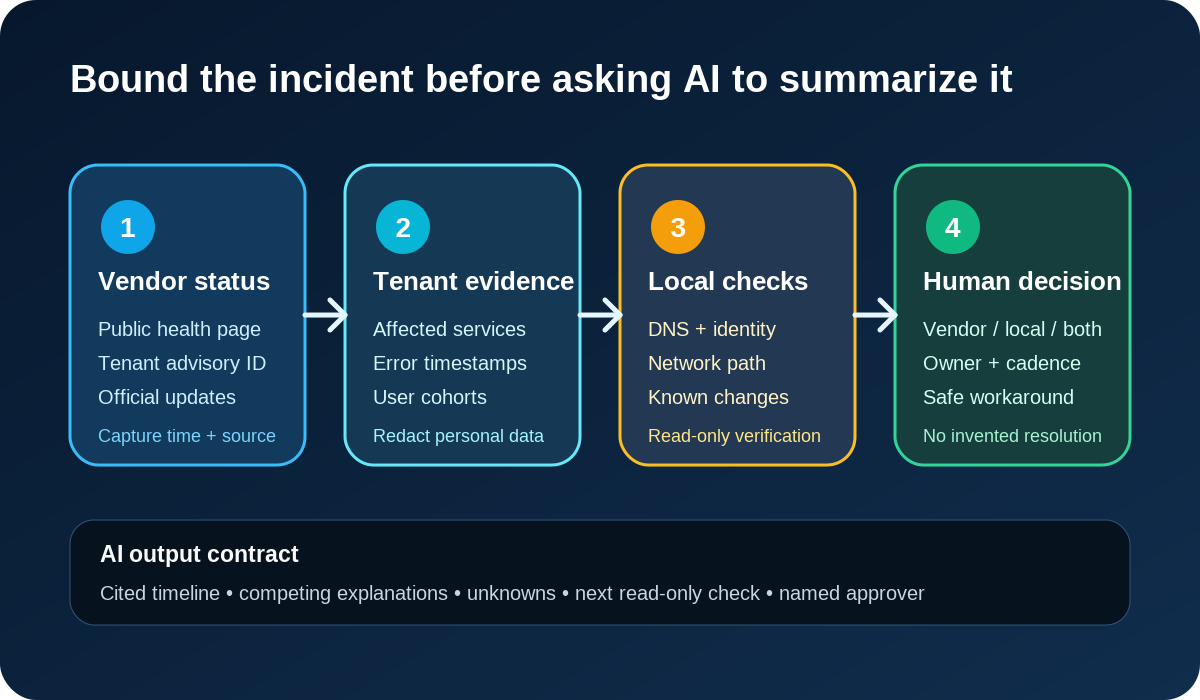
This pattern fits managed service providers, Microsoft 365 administrators, service desks, security operations teams and business continuity leads. A pilot needs the Microsoft public service-health page, tenant Service Health records, identity and network telemetry, a ticket system, an approved model, read-only retrieval and an authoritative communications channel.
The assistant may normalize timestamps, cluster matching symptoms, list contradictions and draft a cited update. It may not reset accounts, alter DNS, disable security controls, publish a status message, contact users, mark the incident resolved or treat social-media posts as authoritative. Keep personal data, message content and tokens out of the prompt unless an approved process explicitly allows them.

- System of record: tenant Service Health, ticketing, identity, network and endpoint monitoring.
- AI role: assemble a cited timeline, impacted cohorts, competing explanations and missing evidence.
- Human role: validate cause, approve workarounds, own communications and declare recovery.
- Stop condition: inaccessible tenant advisory, conflicting timestamps, sensitive content or a requested write action.
Step 1: build an evidence contract before a summary
Normalize each item into evidence ID, source, collection time, event time, tenant or location, service, user cohort, observed symptom, error code, sensitivity and confidence class. Preserve the original record outside the model. Label official vendor records, tenant-only advisories, local telemetry and user reports separately; never collapse them into one undifferentiated timeline.
A missing Service Health entry or failed local query must remain unknown. Capture the time zone explicitly because vendor, tenant and local systems may not agree. Hash or link large attachments rather than pasting them into a prompt, and log every retrieval and model run.
Step 2: request a competing-explanations brief
Give the model only the bounded evidence window and read-only tools. Ask for observations before interpretation, evidence against each explanation and the least-invasive next check. Avoid a prompt that asks, “Why is Microsoft 365 down?” because it encourages a single confident narrative before local conditions are verified.
Example prompt: “For incident M365-214, use only evidence M-100 through M-176 and approved read-only tools. Return a cited timeline, affected services and cohorts, and three separate explanations: vendor incident, local fault, or both. For each explanation list supporting and contradicting evidence IDs, unknowns, and the next read-only check. Draft a 90-word internal update that states uncertainty. Do not change a tenant, reset credentials, disable a control, contact users or claim recovery.”
- Expected output: a review packet, not an automated root-cause determination.
- Reject factual lines without an evidence ID and timestamp.
- Require the original tenant record beside any vendor-status summary.
- Use deterministic monitors—not the model—to decide whether a health check passed.
Step 3: separate service continuity from outage-themed phishing
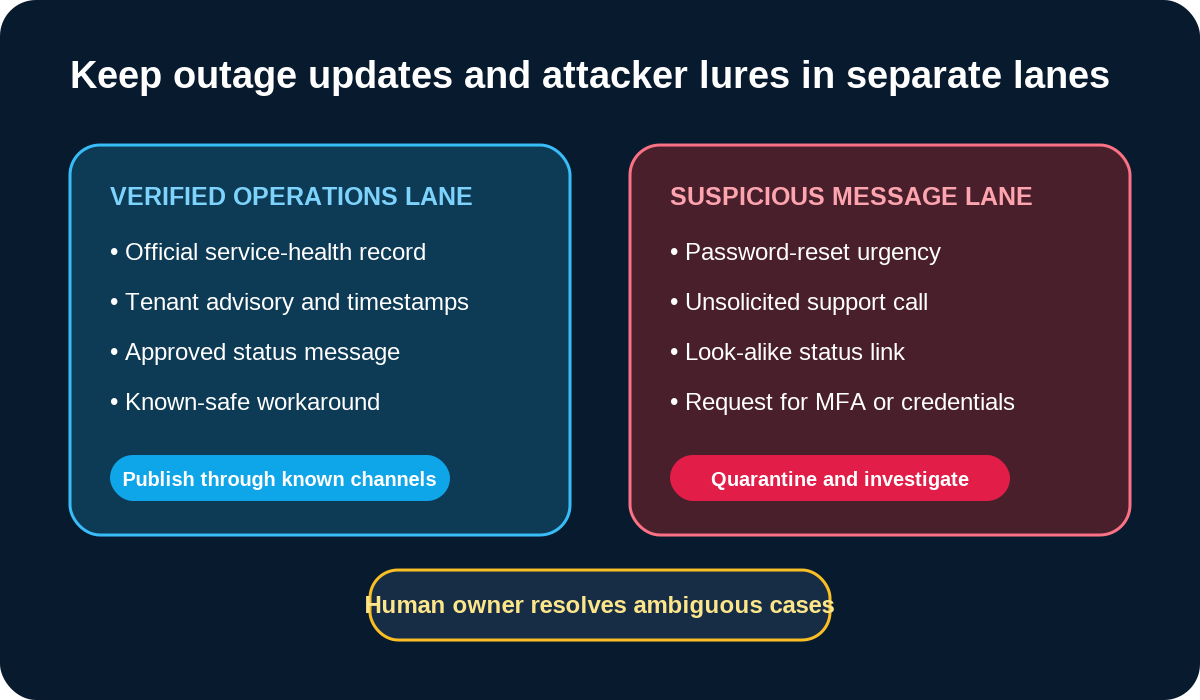
An outage increases pressure to click a reset link or accept unsolicited support. Put suspicious messages, calls and look-alike status pages in a separate security queue. The outage brief may reference that queue, but the model must not treat a lure as service-health evidence or expose the message to a broader audience.
Use known bookmarks and established help-desk channels. Ask staff to report unexpected password-reset, MFA or support requests, and preserve message headers for the security team. A genuine outage does not make an unsolicited credential request safe.

Step 4: keep verified updates and suspicious messages in different lanes
Publish operational updates only through preapproved channels and link to the official tenant or public status record when appropriate. Quarantine suspicious messages and investigate them under the normal email-security process. If a message cannot be classified quickly, route it to a named human owner rather than asking the assistant to make the final call.
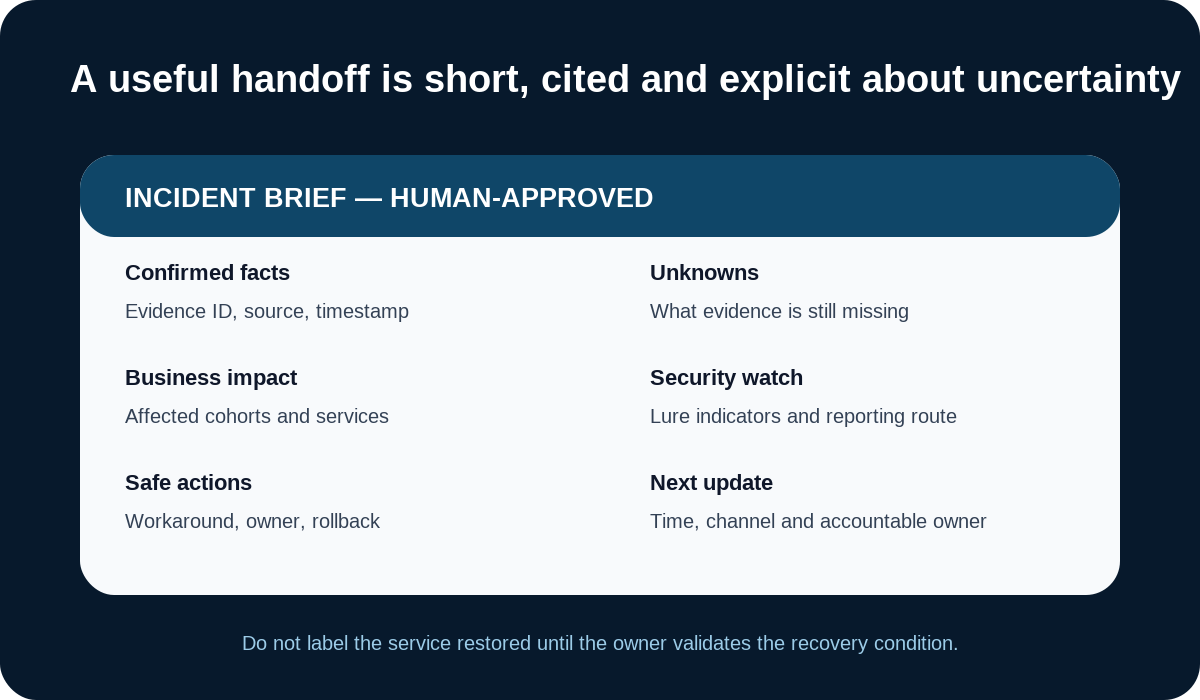
Your internal update should state confirmed facts, impacted services, current workaround, unknowns, security watch-outs, owner and next update time. Do not copy vendor language that is stale for your tenant or promise a recovery time the source did not provide.
Step 5: close only after local recovery is verified
Define recovery conditions before the incident: successful sign-in, mail flow, collaboration, business-critical automation and security telemetry across representative cohorts. After the vendor reports recovery, run those checks from your tenant and record the result. A green public page does not prove every local dependency recovered.
The final handoff should preserve official and local timelines, workarounds, phishing observations, unresolved errors, owners and follow-up actions. The assistant may draft it; the incident owner approves the content and closure.
Realistic limitations and why this topic was selected
AI cannot see a tenant advisory it is not authorized to retrieve, prove the vendor’s root cause, validate a workaround in every location or detect every phishing lure. It can merge unrelated symptoms, leak tenant data, repeat stale status text or turn missing evidence into a confident story. Human-owned incident command, privacy controls and deterministic health checks remain necessary.
A focused Firecrawl search on November 14 for “Microsoft 365 outage November 13 2026 service degradation coverage” surfaced fresh USA Today, Mashable, TechRadar, BleepingComputer and security coverage, including the November 13 Field Effect warning. The concentration of dated independent results and an official status destination is a current-attention signal, not proof of search volume, Google rank or DeepSecurity.io traffic.
Put the insight into practice.
Deep Security helps organizations assess risk, validate controls, and build a practical plan to strengthen their defenses.
Talk with Deep Security