
A practical MSP and IT operations guide for delegating supported legacy-portal tasks to AI while preserving credentials, approval, audit evidence and rollback.
Why legacy portal handoffs have current attention
OpenAI published a Shield customer story on November 13 describing Forge agents that navigate ticket, device and software-license portals without APIs. Shield says supported browser workflows are live across its IT-provider network with thousands of runs each month. It reports GPT-6 Astra ran computer-use tasks 35–40% faster on average than models it used previously, with fewer failures and timeouts. Those are Shield’s claims in a vendor customer story; Deep Security did not test the product or reproduce the results.
Independent coverage appeared on November 14, including an explainx analysis that called the deployment a production-shaped datapoint rather than a model launch and emphasized credential handling, data residency and human review. The practical problem is familiar to MSPs and internal IT teams: a ticket can stall because the last step lives in an inconsistent portal that has no usable API. The useful pattern is not “let the agent click anything.” It is to define which portal action is supported, what evidence proves it happened and when a technician must take over.

Audience, tools and the action boundary
This workflow fits managed service providers, help desks, identity teams, software-license administrators and IT operations groups that repeatedly copy information between a ticket and an older admin interface. A pilot needs a ticket system, an approved browser-automation agent, an isolated browser session, a credential broker or vault, a policy service, immutable logs, a test tenant and an accountable service owner.
Start with actions that are observable and reversible. Retrieving a record, comparing device state or drafting a technician note is different from disabling an identity, changing a firewall or touching a production customer. Phone calls, on-site work and remote-desktop tasks still required humans in Shield’s account. Keep ambiguous or high-impact steps manual until the team has evidence for a narrower contract.
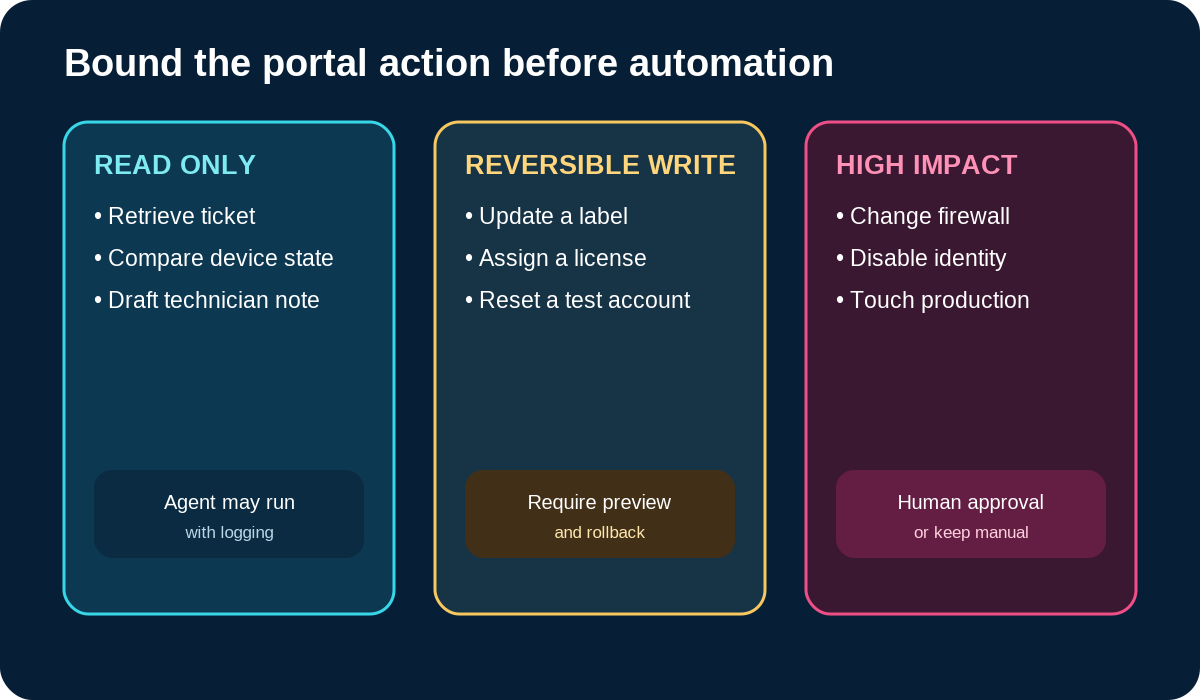
- Agent role: navigate only the named portal and prepare or execute only the named action.
- System role: issue a short-lived session, validate schema and enforce the action allowlist.
- Human role: approve impact, exceptions, new portal versions and rollback.
- Stop condition: unexpected page, stale ticket, missing identity, conflicting evidence or unavailable recovery.
Step 1: define one portal transaction
Choose one frequent request with a clear owner, such as reading a device status, assigning a test license or updating a ticket label. For 20 to 50 completed cases, record the requested outcome, portal version, required fields, technician path, exceptions, authorization source, after-state and rollback. Exclude cases that need customer judgment, voice contact, physical work or a second untracked system.
Write an action contract with the exact URL origin, permitted account, allowed pages, fields that may be read, fields that may be changed, required ticket state, maximum duration, retry count and evidence. A portal redesign or authentication change invalidates the contract until it is retested.
Step 2: isolate credentials and browser state
Do not give the model a reusable technician password. Start a clean browser session, exchange workload identity for a short-lived portal credential when possible, limit the account to the smallest role and revoke the session at completion. Keep customer cases separated so cookies, downloads and page state cannot cross tenants.
Block arbitrary outbound destinations, downloads and clipboard transfer unless the transaction requires them. Store secrets outside prompts and screenshots. Redact sensitive fields from the agent’s observation when they are not needed for the action, and alert on navigation to an origin outside the contract.

Step 3: make the output reviewable
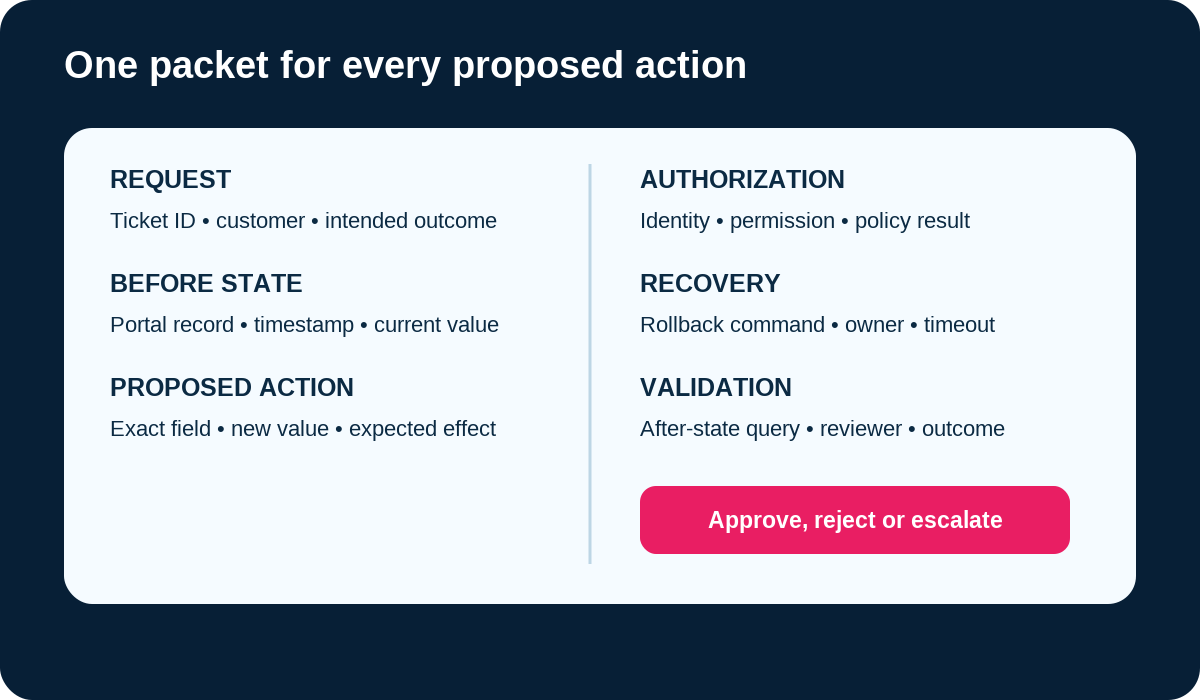
Example prompt: “For ticket T-4821, use only the assigned test-tenant portal and the approved action contract LP-7. Confirm the ticket owner and current portal record, then return the before state, proposed field change, policy result, expected after state, rollback and evidence locations. Do not reuse credentials, visit another origin, change any unlisted field, retry after an authentication error or mark the ticket complete. If the page differs from the contract, stop and escalate.”
The expected output is a transaction packet, not a paragraph saying the task succeeded. Capture the ticket ID, session identity, portal version, before-state fields, action, after-state query, screenshots or DOM evidence where policy permits, elapsed time, errors and reviewer decision. The system of record—not the agent—should decide whether the ticket can close.
- Reject success without a matching after-state query.
- Treat a timeout or changed selector as an exception, not permission to improvise.
- Keep model reasoning out of the authorization decision.
- Sample successful runs as well as failures for hidden drift.
Step 4: pilot from replay to a small cohort
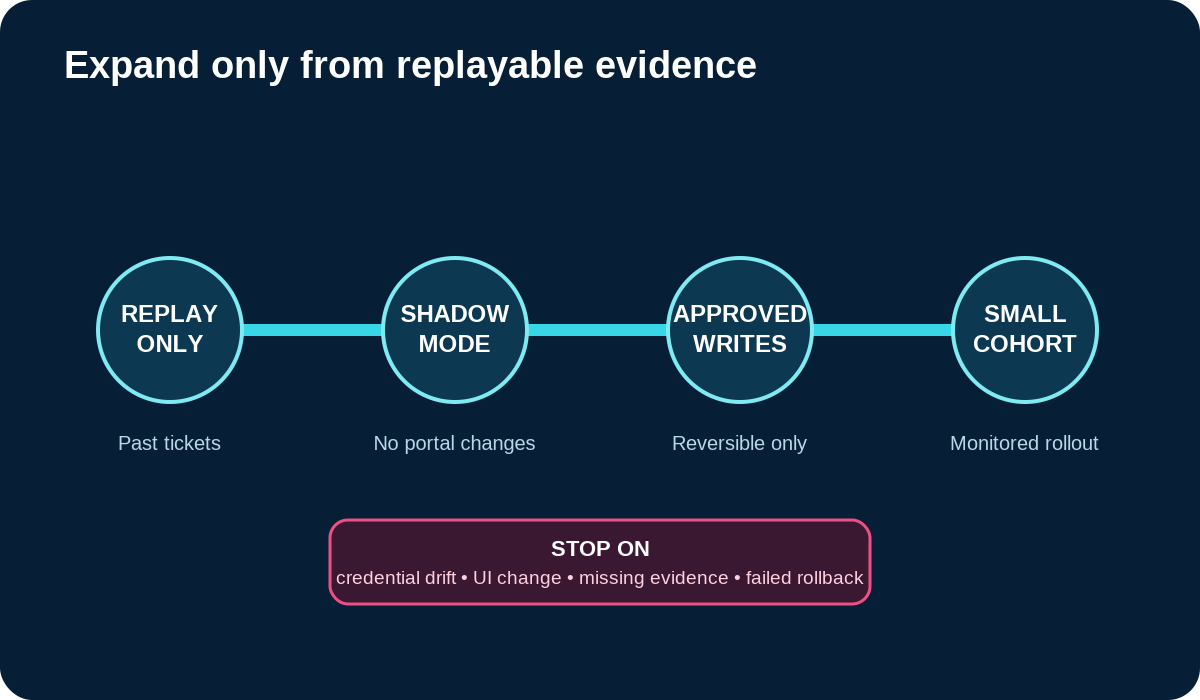
Replay historical cases first, then run shadow mode without portal changes. Compare the proposed action with the technician’s actual action and classify disagreements. Only after the team understands error classes should it permit a reversible write behind human approval.
Expand by action and tenant, not by a vague claim that the agent is ready. Pause on credential drift, interface change, evidence loss, policy mismatch or failed rollback. Track exception rate, technician correction, unauthorized navigation, time to recover and customer impact alongside resolution time.
Realistic limitations and why this topic was selected
Computer-use agents remain brittle around layout changes, CAPTCHAs, multifactor prompts, accessibility gaps, slow pages and ambiguous success states. A fluent model can click the wrong similarly named control, expose one customer’s data to another session or complete a portal action that does not satisfy the original ticket. Browser automation does not remove the need for portal authorization, change control, incident ownership or tested rollback.
A focused Firecrawl search on November 17 for “Shield Forge OpenAI legacy portal technicians November 13 2026” returned independent coverage first, followed by multiple dated analyses and the November 13 primary customer story. That mix established current attention and a strong fit for Deep Security’s MSP and IT-operations audience. Search placement is a discovery signal, not evidence of traffic, adoption, Google rank or typical results.
Put the insight into practice.
Deep Security helps organizations assess risk, validate controls, and build a practical plan to strengthen their defenses.
Talk with Deep Security