

A practical AI-assisted workflow for verifying high-risk password and MFA recovery requests without trusting voice, urgency or model confidence.
Why the help desk is now an identity control point
Barracuda’s November 20 analysis describes a practical attack path: instead of defeating multifactor authentication directly, an attacker impersonates an employee and asks support to reset the password or register a new factor. Amazon’s November 13 threat research also documented an AI-agent campaign using deepfake video and forged documents to defeat identity checks at cryptocurrency exchanges. The targets differ, but both examples show why a convincing voice, face or story cannot be treated as proof.
Independent Biometric Update coverage on November 19 grouped several new identity-proofing and deepfake-detection products around the same workforce gap—from hiring and onboarding to high-risk moments after employment. That fresh cluster makes the operational use case timely for managed IT teams: use AI to assemble a bounded recovery packet, then keep the actual identity decision with trained people and authoritative systems.

Set the boundary and required tools
This workflow fits internal service desks, MSPs, identity teams and security operations groups handling password resets, MFA replacement and privileged-account recovery. Use an approved ITSM queue, authoritative directory or HR record, identity-provider sign-in history, device-management posture, a known callback channel and a second reviewer. An enterprise-approved model can summarize the request and reconcile exported evidence. A synthetic-media detector can add a signal, but it cannot establish identity by itself.
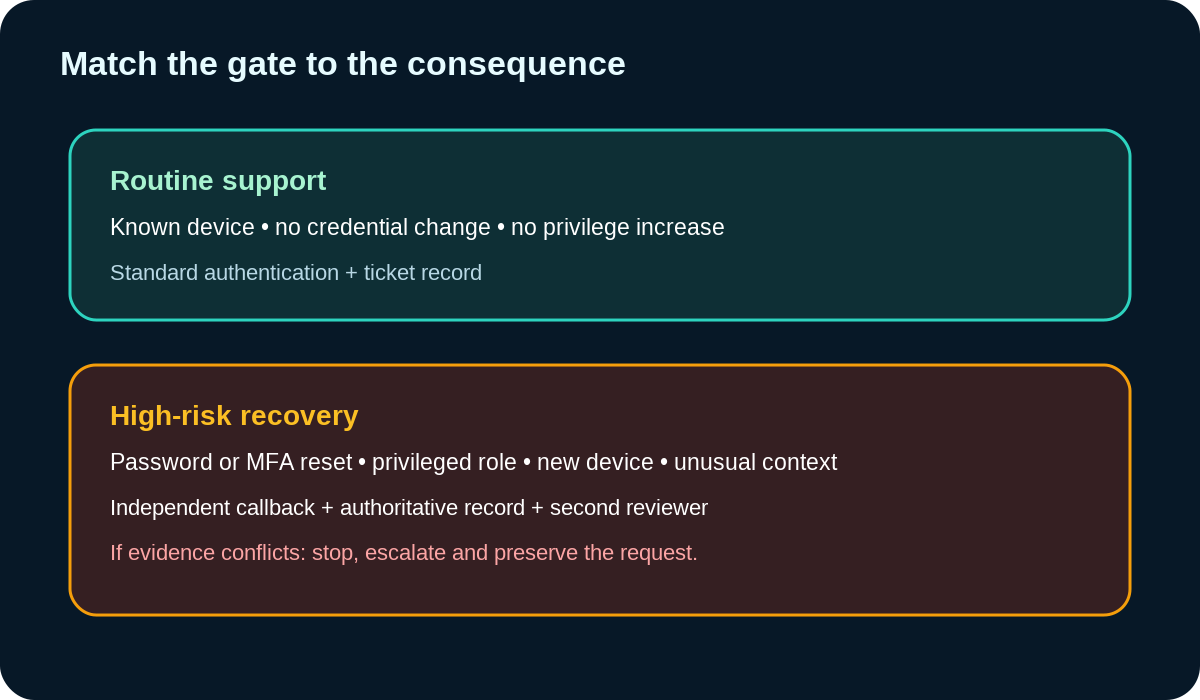
Before the pilot, classify which requests are routine and which are high risk. Any factor reset, privileged account, new device, unusual location, changed phone number or exception to normal policy should enter the high-risk lane. Do not stream raw voice, biometric or HR data to an unapproved model; minimize data, define retention and have privacy or legal owners review local requirements.
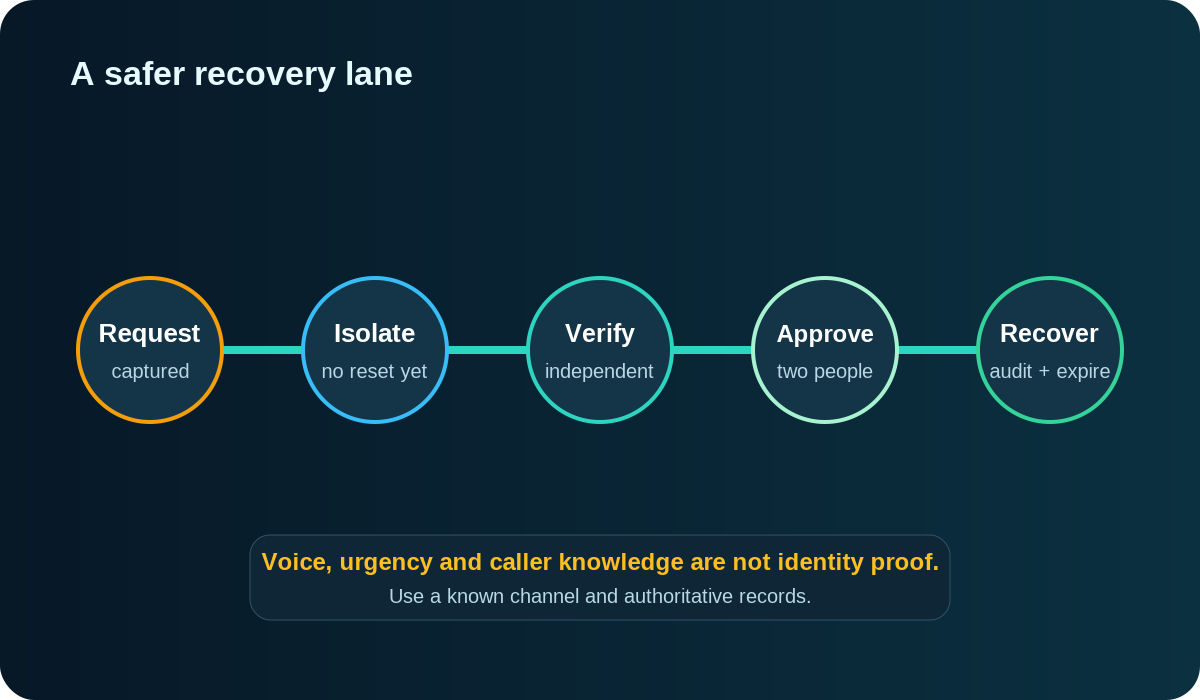
- Allow: summarize a ticket, compare approved records and cite conflicts.
- Ask: expand the time window, retrieve sensitive attributes or contact another owner.
- Deny: reset credentials, enroll a factor, change a phone number or approve itself.
- Record: source IDs, timestamps, reviewer, decision, recovery scope and expiration.
Step 1: build a claim-versus-evidence packet
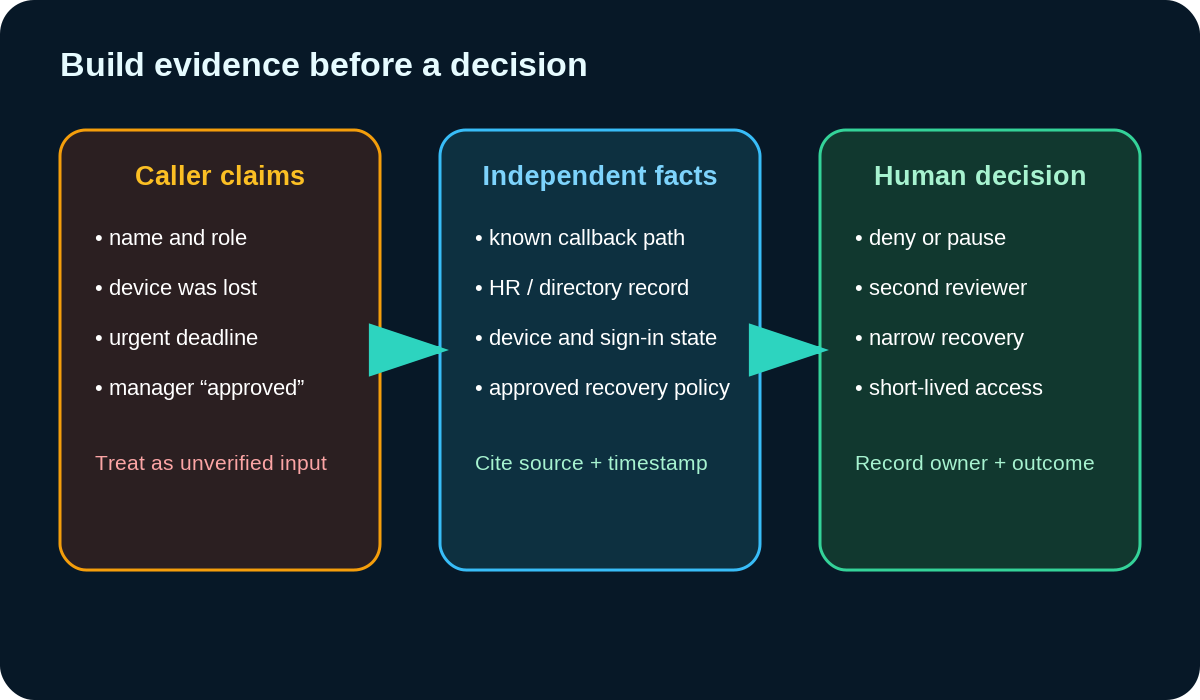
Freeze the requested action and give the model only the ticket, caller claims and approved evidence exports. Example prompt: “For ticket HD-204, separate every caller-provided claim from independently retrieved facts. Cite the source system, record ID and timestamp for each fact; flag contradictions, missing evidence, recent profile changes, unusual sign-ins and device mismatch. Do not infer identity, score the person or recommend a reset. Output the smallest next verification step.”
Expected output is a compact table of claims, corroborating or conflicting evidence, freshness and open questions. It is an illustrative format, not a tested accuracy benchmark. A reviewer must open the original records; copied exports can be stale, incomplete or manipulated.
Step 2: verify through a known channel
End the inbound interaction for high-risk changes and initiate verification through a channel already on record—not a number, email or meeting link supplied during the request. Use a known manager route, registered device prompt, in-person check or established recovery credential according to policy. Do not ask knowledge questions based on public information.
A second staff member reviews the packet and the independent check before authorizing a narrow recovery. If identity signals conflict, pause the request, preserve the evidence and escalate to identity or security responders. Synthetic-media detection may support the review, but false positives, false negatives, accents, noise, accessibility needs and replay attacks make it unsuitable as a sole gate.

Step 3: recover narrowly and watch the account
Bind approval to one action and one account. Prefer a short-lived recovery credential or temporary access method, force re-registration through the normal trusted path, revoke old sessions as policy requires and alert the account owner through a separate channel. For privileged accounts, involve the system owner and security team.
After recovery, monitor new factor enrollment, sign-ins, role changes, mailbox rules, OAuth grants and sensitive actions for an agreed period. Attach results to the ticket. If the requester never completes the trusted recovery path, expire the temporary access and close the loop as unresolved rather than successful.
Limitations and topic-selection signal
AI can make a messy ticket easier to review, but it cannot prove who is speaking, determine whether a biometric signal is lawful to process or compensate for a compromised directory. A model can also blend claims and facts, overvalue a detection score or expose sensitive data. Keep a manual path, test accessibility, measure reviewer corrections and audit exceptions instead of optimizing for automatic closure.
Focused Firecrawl searches on November 21 returned Barracuda’s November 20 help-desk analysis, Amazon’s November 13 primary threat research, November 18–19 workforce-identity coverage and multiple fresh independent articles. That is a current public-attention signal and a direct managed-IT use case; it is not proof of search volume, adoption, DeepSecurity.io traffic or ranking.
Put the insight into practice.
Deep Security helps organizations assess risk, validate controls, and build a practical plan to strengthen their defenses.
Talk with Deep Security