
Evaluate Fortinet's new cloud-delivered AI inspection service on one synthetic traffic path before applying prompt, response or MCP controls broadly.
What Fortinet announced and what remains unverified
Fortinet announced the FortiGuard Inline AI Security Service on October 26 as a cloud-delivered option for FortiGate customers. Fortinet says FortiAIGate-based guardrails can inspect prompts, model responses, MCP tool traffic and agent actions, apply data-loss prevention, discover shadow AI and enforce policies without separate customer-managed AI-security infrastructure.
The announcement distinguishes the cloud-delivered service from self-hosted FortiAIGate, which Fortinet positions for customers with greater privacy, sovereignty and processing-control requirements. Fortinet's public product page also describes budgets, rate limits, workspaces, audit logs and inspection across text, images, audio, video and code.
Industrial Cyber covered the release on October 30, and a focused Firecrawl search that day returned the primary announcement first with several same-week follow-ups. That is evidence of fresh coverage, not adoption, effectiveness, traffic or ranking. Public pages did not provide a list price or a complete FortiGate eligibility matrix; verify licensing, model support, regions and capacity with Fortinet before calling a pilot available.
1. Choose one reversible AI traffic path
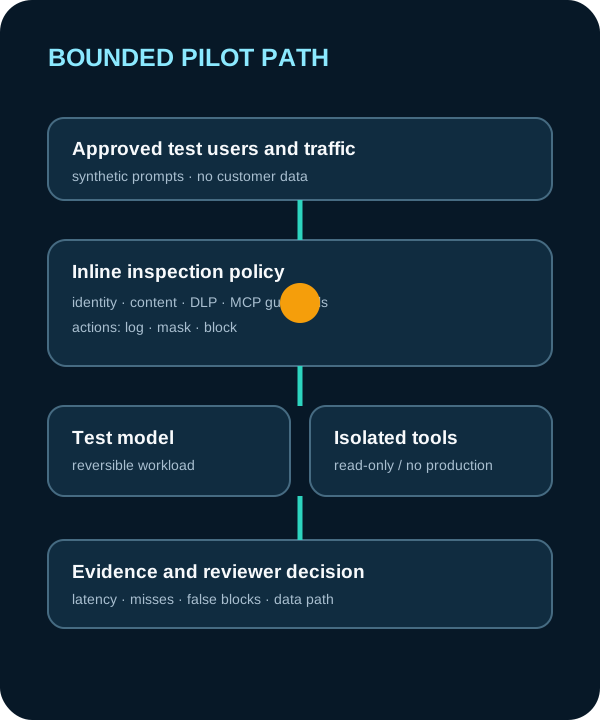
Select one internal test application, one model endpoint and read-only or simulated tools. Exclude customer data, regulated records and production credentials. Document whether traffic reaches the cloud-delivered service or a self-hosted FortiAIGate instance, which logs are created and who can read them.
Define the exact FortiGate policy path, TLS inspection prerequisites, supported protocols and failure behavior. If the service is unavailable, decide whether the test should fail closed, bypass inspection or stop the application. That decision belongs to the workload owner and security architecture, not the product demo.
The expected output is a one-page pilot boundary with identities, traffic, policies, regions, retention, owner and rollback steps.

- Verify subscription, FortiGate version, region and model or MCP coverage in writing.
- Use synthetic PII and canary tokens rather than real secrets.
- Keep a bypass and removal procedure ready before changing the path.
2. Test allow, mask and block behavior
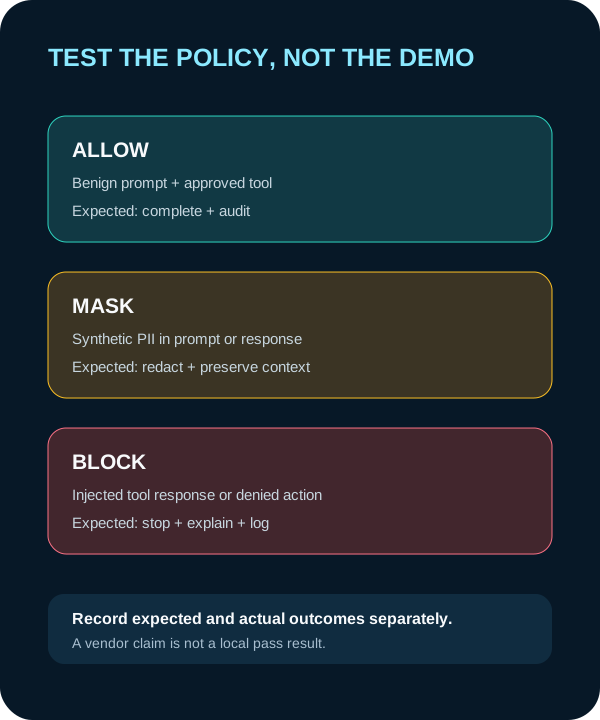
Create a versioned fixture set with benign prompts, synthetic PII, canary credentials, direct prompt injection, injection hidden in an approved tool response, a denied tool call and harmless content likely to resemble a violation. Record the expected policy and evidence before running it.
For every fixture, capture the rule, action, redacted event, application result, analyst explanation and actual disposition. A block without an understandable reason may be hard to operate; an allow without evidence may hide a coverage gap.
Example review prompt for an approved internal assistant: 'Compare pilot evidence set FG-31 with the signed expectations. Return fixture ID, expected action, observed action, cited log field, policy, latency and reviewer question. Do not change policy or replay traffic.'
3. Measure operating cost, privacy and failure modes
Measure application latency at representative load, guardrail time, false blocks, misses, analyst review time and logging volume. Fortinet describes low latency and low false positives as product capabilities, but DeepSecurity.io did not test those claims.
Trace where prompts, responses, tool calls and derived logs travel. Confirm retention, access, tenant isolation, encryption, support access and deletion. If the cloud-delivered path cannot satisfy the workload's privacy or sovereignty requirements, compare self-hosted FortiAIGate rather than weakening the requirement.
Test outage, certificate, policy-distribution and rollback scenarios. A security control that silently disappears or breaks the business workflow needs a documented owner and alert.

4. Decide whether to expand, revise or remove
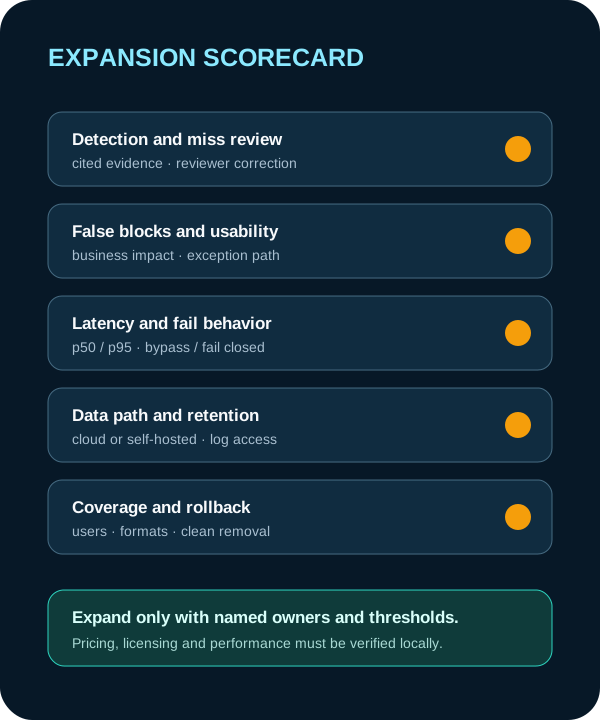
Set thresholds before the pilot: required fixture coverage, maximum false blocks, acceptable latency, complete audit evidence, approved data path and a successful rollback. Assign a named owner for every exception.
Expand only to another bounded traffic path after the first result is reviewed by security, privacy, networking and the workload owner. Do not assume one policy covers every model, content type or agent tool.
The closeout should state the Fortinet subscription and versions tested, exact traffic path, fixture results, missing coverage, reviewer corrections, operating cost, data-handling decision and rollback result.
Put the insight into practice.
Deep Security helps organizations assess risk, validate controls, and build a practical plan to strengthen their defenses.
Talk with Deep Security