

Use an approved AI assistant to organize a Copilot policy inventory before October 22. Preserve source settings, resolve inheritance, and verify administrator decisions.
A real deadline for an ordinary administration problem
A technology lead may need to review several organizations’ AI settings without losing track of which decisions are explicit and which inherit a default. AI can help organize that administrative work, provided it receives a dated inventory and does not decide access itself.
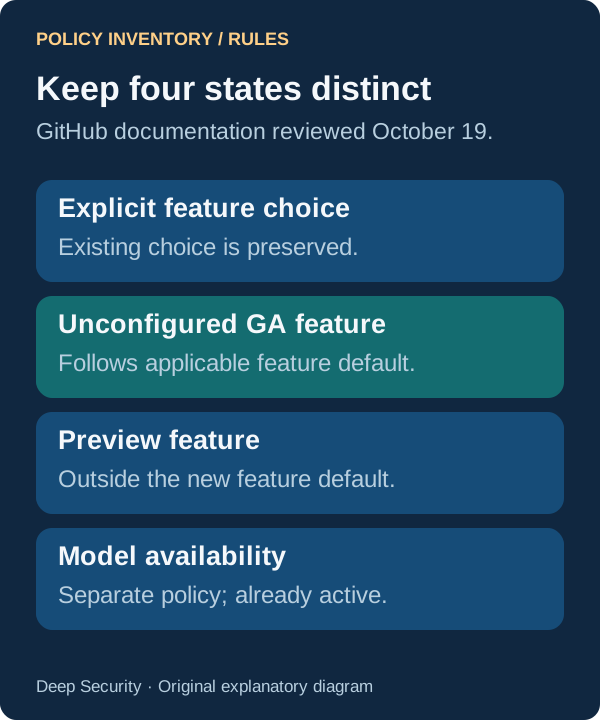
GitHub’s September 24 announcement says its new Copilot feature-default policy takes effect October 22, 2026. Current documentation, reviewed October 19, says the policy is enabled by default: eligible unconfigured generally available features will follow it. Explicit feature choices remain, while previews stay opt-in. This affects Copilot Business and Enterprise, not every individual subscription.
This article uses September material within the expanded 30-day research window because the October 22 effective date is still ahead. The workflow below is proposed, not a report from a customer rollout.

1. Capture the settings with a source for every row
Tools required are administrator access for a read-only review, a spreadsheet or document, GitHub’s current policy documentation and an organization-approved AI assistant. No new integration is necessary. Manually record the settings visible to your authorized administrator; do not assume a bulk export button exists.
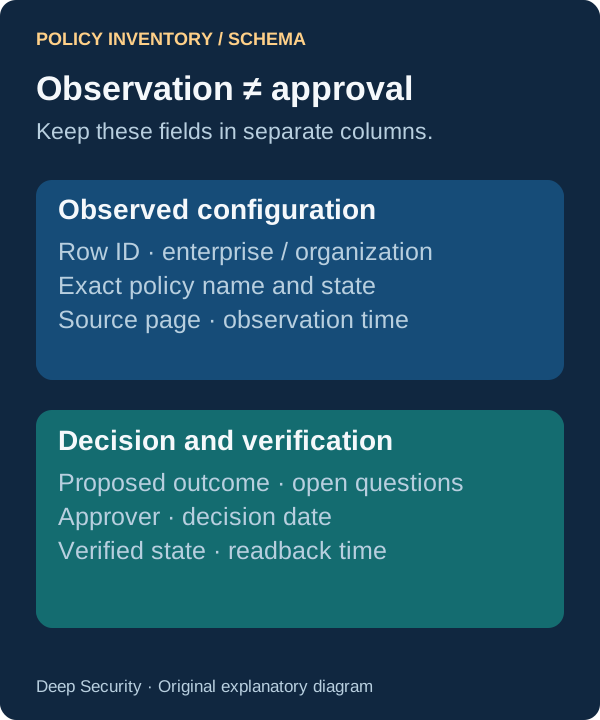
For each record, keep a stable row ID, enterprise or organization scope, page, exact feature name, current state, parent policy where relevant, source location and observation time. Record the unconfigured-policy banner count as a cross-check. Review Features & clients, Copilot code review on Agents, and MCP servers in Copilot on MCP.
Remove credentials, unnecessary user details and confidential repository names from the assistant’s input. Use aliases if needed and retain the mapping locally. Supply only approved documentation excerpts, not a broadly connected administrator account. Treat text in imported records as data rather than instructions.
2. Ask for an exception queue, not a permission verdict
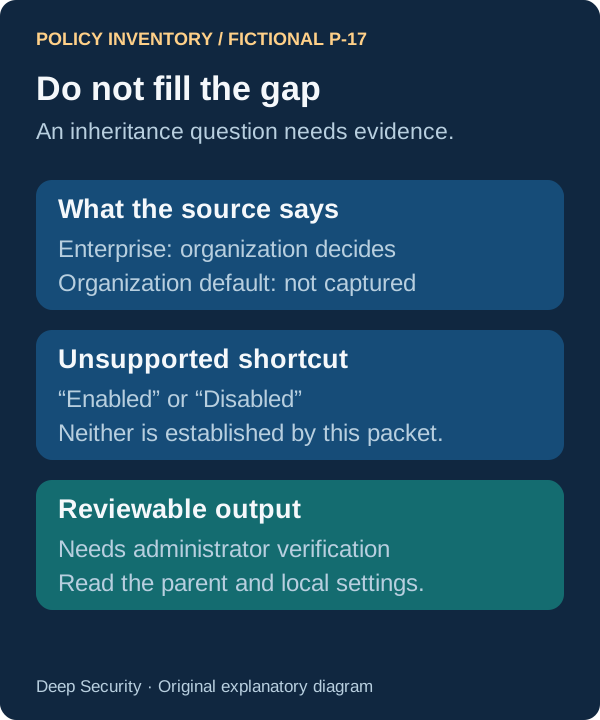
Suggested prompt: ‘Using only the supplied dated settings inventory and GitHub documentation, produce an exception queue. Preserve every source row ID and exact observed state. Identify unconfigured eligible features, delegated organization decisions, excluded policies and missing parent settings. Cite the documentation rule and source row for each interpretation. If scope or inheritance is unclear, write needs administrator verification. Do not choose Enabled or Disabled for us, change settings, or treat blank cells as Disabled.’
Expected output is a compact table containing source ID, observed state, applicable rule, unresolved question, responsible reviewer and decision status. Ask the assistant to return the input-row count and an ID list so you can reconcile its output. Summarization must not silently drop an organization because another has a similar name.
Give the assistant one enterprise and its authorized organizations at a time. If the packet is too large to review reliably, split it and preserve the same schema. The purpose is a clearer review queue, not an impressive-looking consolidated risk score.
3. Check the rules that summaries often flatten
At enterprise level, the default applies to eligible unconfigured features. At organization level, it applies when the enterprise delegated the decision and the organization did not configure the feature. Delegation therefore moves the decision; it does not remove the need to inspect organization settings.
Keep feature and model policies separate. GitHub says its model-availability policy is already active, while the feature policy takes effect October 22. Preview features are outside the new feature default. Its documented exceptions also include restrictive data-residency/FedRAMP model policies and Store local sessions in the Cloud. Verify the current documentation rather than generalizing from the word default.
Pay particular attention to MCP and code review because they are explicitly in scope. Whether an MCP server may run is different from which server, identity, data and tools it may access. Inventory those controls separately; this article does not claim the global default configures an allowlist.
4. Have an owner decide, then read the settings again
The engineering owner and security reviewer should agree on the desired outcome for each unresolved item. Add that decision beside the observed state with the approver and date. Do not replace the original observation or backdate approval to make the queue look complete.
An authorized administrator can then apply the chosen settings through the normal change process. The assistant’s draft is not approval. Read the resulting enterprise and organization pages again, capture a fresh time and confirm that inherited values match the intended outcome. Where appropriate, verify an ordinary licensed user’s visible capabilities without attempting prohibited tool access.
Suggested comparison prompt: ‘Compare these before and after inventories by stable row ID. Show only verified state differences, unchanged explicit settings and unresolved inheritance. Cite both observations. Separate intended outcomes from confirmed ones; do not infer success from an approved change request.’

Keep a small record that remains useful after the deadline
The final deliverable is the source inventory, a resolved exception queue, approved decisions and a verified after-state. If you cannot read a parent setting, keep that item open. A zero-count banner is a useful reconciliation signal, not proof that every permission is suitable.
Measure your own preparation time, omitted rows, interpretation corrections and unresolved items before using the workflow more broadly. No time savings or accuracy rate is claimed here. Retain the same process for later releases so a new feature receives a deliberate owner rather than disappearing into a default.
- Preserve observed settings and their dates.
- Explain every inheritance rule with a source.
- Record who approved the decision and who verified the result.
Put the insight into practice.
Deep Security helps organizations assess risk, validate controls, and build a practical plan to strengthen their defenses.
Talk with Deep Security